What are LinkedIn impressions, and how are they different from reach?
What are LinkedIn impressions? The number of times your post was shown on screen, counting repeat views, unlike members reached.
LinkedIn impressions are the number of times your post was shown on LinkedIn, and they count every showing, including repeat views by the same person. If one connection scrolls past your post three times, that's three impressions but only one member reached.
Below: where to find the number, how it's counted, and what it tells you about a post.
What LinkedIn counts as an impression
An impression is one showing of your content on someone's screen. LinkedIn's page on analytics for your content defines LinkedIn impressions plainly as the "number of times your post was shown on LinkedIn."
That definition is about display, not attention. An impression doesn't mean someone read the post, clicked it or even stopped scrolling.
For content posted by a LinkedIn Page, LinkedIn's marketing help is more precise. There, an impression is counted when the content is at least 50 percent on screen for 300 milliseconds or more, or when it's clicked.
LinkedIn doesn't publish a timing threshold for posts from a personal profile. The Page rule is the clearest description LinkedIn gives of what "shown" means, so it's a reasonable guide, but it's documented for Pages.
Impressions vs members reached
The most useful thing to understand about impressions is what they aren't: a count of people.
LinkedIn reports a separate number for that, called Members reached. It's the number of distinct members and Pages that saw your post, and it doesn't include repeat views.
So the two numbers answer different questions:
- Impressions: how many times was the post displayed?
- Members reached: how many different people saw it at least once?
Impressions are almost always the higher of the two.
The gap tells you something too. A big gap means the same people saw the post several times, which usually happens when it keeps resurfacing in feeds through new comments.
Where to see impressions on your LinkedIn posts
Post analytics are private to you. Nobody else sees your impression counts.
On a computer:
- Click Me, then under Manage, select Posts & Activity.
- Choose the tab for the content type: Posts, Videos, Images, Articles or Newsletter.
- Click the impressions number in the lower left of a post, or View analytics in the lower right.
On the LinkedIn app, tap your profile photo, go to your profile, then Activity and Show all posts. Pick the tab, then tap the impressions count or View.
The other discovery numbers next to impressions
Impressions sit in a group LinkedIn calls discovery metrics. Reading them together tells you much more than the headline number.
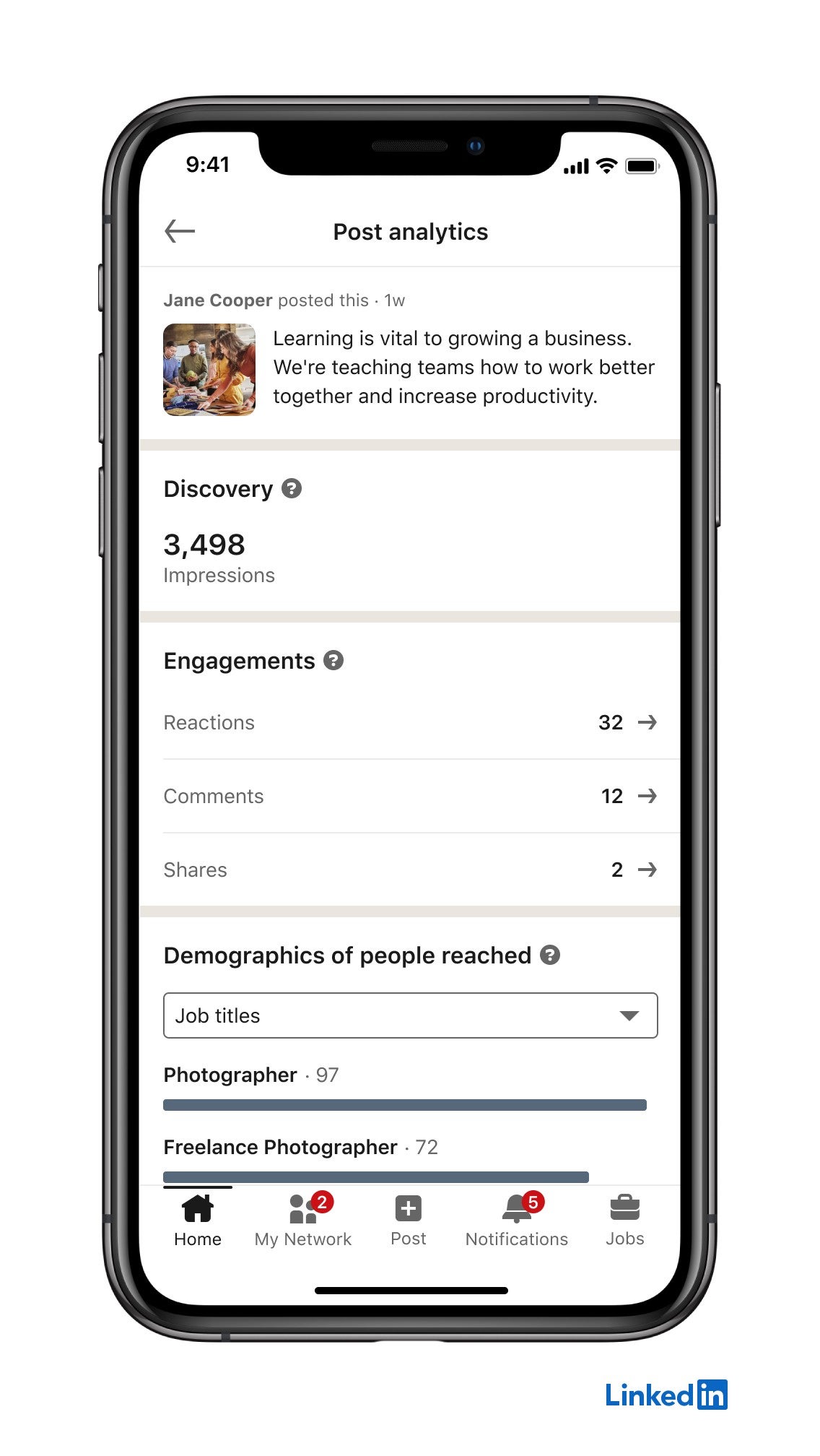
LinkedIn's help page on viewing your content analytics lists them:
- Impressions, the total showings.
- Members reached, the distinct people.
- In network, the share of impressions from your connections and followers.
- Out of network, the share from people outside that group.
The in-network and out-of-network split is the one most people ignore. A post with a high out-of-network share traveled beyond your own audience, usually because reactions and comments pushed it into new feeds.
Your own views count too
This detail surprises people. LinkedIn says your own views of your content are counted towards its analytics.
If you open your post ten times to check the comments, that adds to the number. On a small post, it can make a visible difference.
It's one reason to look at impressions across many posts rather than obsessing over one.
Why LinkedIn impressions are estimates
LinkedIn states that the numbers in post analytics are estimates and may not be precise.
That's normal for this kind of metric. Counting every on-screen display across phones, browsers and apps is messy, and small differences don't mean much.
Treat impressions as a direction, not an exact score. A post with 4,000 impressions did better than one with 400; a post with 1,020 didn't meaningfully beat one with 980.
What a good number of impressions looks like
There isn't a universal benchmark, and anyone quoting one is guessing about your audience.
The honest comparison is against yourself. Take your last ten or twenty posts and note the typical impression count. That's your baseline.
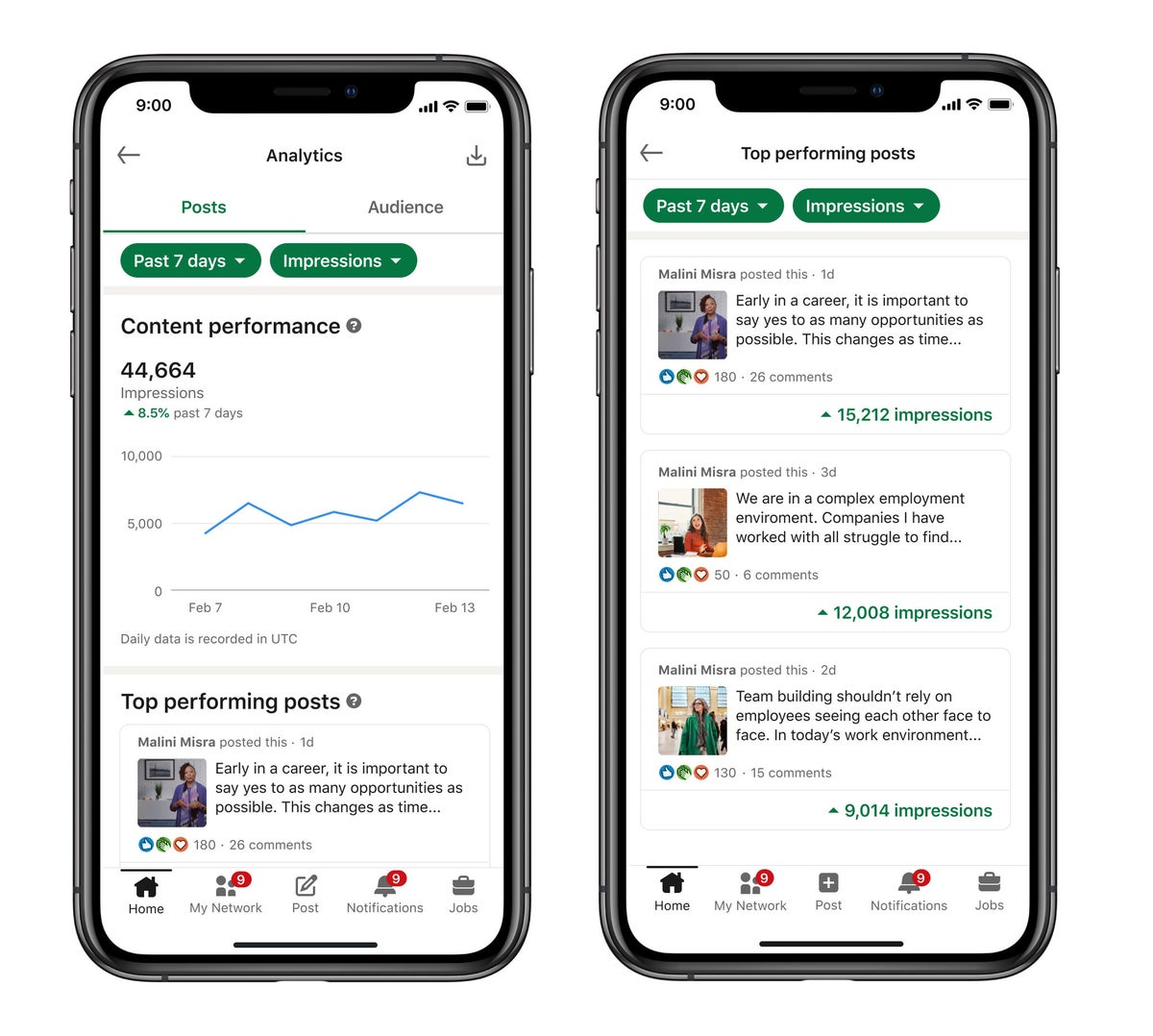
A post that lands well above it reached people your posts don't usually reach. A post well below it either went out at a quiet time, or the topic didn't land.
Network size matters a lot here. A profile with 300 connections and one with 30,000 followers shouldn't be judged on the same scale.
Why impressions rise and fall between posts
Impressions depend on how LinkedIn's feed decides who sees a post, and how early viewers react to it.
When the first people to see a post react or comment, LinkedIn tends to show it to more people. When they scroll past, distribution slows.
If you want the mechanics behind that, this explainer on how the LinkedIn algorithm works goes deeper.
Three things you control make the biggest practical difference:
- Timing: posting when your audience is online gives the post early reactions.
- Replies: answering comments keeps the conversation active, which keeps the post in feeds.
- Format: some formats hold attention longer, so they get more chances to be seen.
Impressions vs engagement: which matters more?
Impressions tell you how often the post was seen. Engagement tells you whether anyone cared.
A post with high impressions and almost no reactions reached people but didn't move them. That's a message problem, not a distribution problem.
A post with modest impressions and lots of comments is often worth more. It found the right people, and those people responded.
For most professionals, impressions are the top of the funnel, not the goal. The goal is the profile views, messages and connection requests that follow.
How long LinkedIn keeps impression data
LinkedIn doesn't keep every number forever, and the windows differ by metric.
According to its help pages, discovery and engagement counts are available for 1,000 days, while members reached is available for 400 days. Demographic breakdowns are kept for a shorter period, 180 days.
If you want to compare this year with last year, export or note the numbers you care about while they're still available.
When audience details aren't shown
LinkedIn also shows who saw your post, such as job titles, companies and locations.
But not always.
Demographic data isn't available for posts shared to connections only, or for posts in Groups. On those posts, you'll see impression counts but not the breakdown of who the viewers were.
If audience insight matters for a post, share it publicly.
Impressions on LinkedIn Page posts vs personal posts
If you post for a company as well as for yourself, you'll see impressions in two places, and they're measured under different documentation.
Posts from your personal profile show impressions in your own post analytics, as described above. Posts from a LinkedIn Page show them in the Page's content analytics, which Page admins can open.
The Page version comes with the precise counting rule: at least half the post on screen for 300 milliseconds or more, or a click. LinkedIn's Page content analytics help explains the rest of the Page metrics too.
In practice, the two numbers behave alike. Both count showings rather than people, and both climb when early viewers react.
The difference is audience. A Page's impressions come mostly from its followers, while a personal post also travels through your connections' activity.
Compare each one against its own history, never against the other.
What to do after a post gets low impressions
A single weak post isn't a trend. Before changing anything, check whether it's genuinely below your baseline or only below your best post.
If it really underperformed, look at three things in order:
- When it went out. A post published late at night or on a holiday has fewer people around to react early.
- What the first line said. Most viewers only see the opening before the post is cut off, so a slow first line loses them.
- Whether you replied to comments. An early reply often brings the commenter back, which keeps the post active.
Change one thing on the next post, not all three. That way the next impression count tells you which change mattered.
Deleting and reposting the same content rarely fixes anything. It resets the reactions you already had, and it can look odd to people who saw it the first time.
What LinkedIn impressions tell you, in short
LinkedIn impressions count how many times your post was shown, repeats included. They measure visibility, not readership.
Read them next to members reached to see how many people that visibility covered, and next to the in-network split to see how far the post traveled.
Then judge each post against your own baseline, not against someone else's numbers. That's where impressions become useful.
Impression questions people ask
Do LinkedIn impressions count unique viewers?
No. Impressions count every time the post is shown, including repeat views by the same person. Members reached is the number that counts distinct people.
Can other people see how many impressions my post got?
No. LinkedIn says post analytics are private to you. Other members see reactions and comments, not your impression count.
Why don't I see audience details for some posts?
LinkedIn doesn't show demographic data for posts shared to connections only or posted in a Group. Public posts get the full breakdown.