
Best Instagram Grid Makers in 2026: 6 Tools Compared After a Real Profile Test
I split one photo into a 3x3 grid and posted it to a real Instagram profile to see what actually lines up in 2026. Here are 6 Instagram grid makers compared on grid sizes, tile shape, free use and whether they can post the tiles for you.


I posted the same photo as a grid twice, on the same real Instagram profile, on the same day.
The first time, I did it the old way: nine square tiles, posted one by one, with one unrelated post slipping in halfway through. On the phone, the glasses were cut at the edges, the jug broke apart, and from the second row on every tile sat one spot off.
Nothing was wrong with the photo.
The square tiles were made for a profile Instagram retired in early 2025, and the extra post pushed everything after it one place to the right.
The second time, I cut the photo into 3:4 tiles and sent all nine in one sequence. On the phone, they joined into one clean picture.

Same photo, same profile, same day. Left: square tiles with one post in between. Right: 3:4 tiles in one sequence.
That test, run on November 16, 2026, is the lens for this comparison. I checked the result on a phone and on a desktop browser, then compared the IG grid maker tools people actually search for.
What is the best Instagram grid maker?
The best Instagram grid maker is the one that cuts tiles for the current 3:4 profile grid and gets them posted in the right order, bottom right first. For a free, no account split, SocialCal's Grid Splitter and RecurPost's Grid Generator do the job in a browser; if you want the tool to post or schedule all the tiles for you, Circleboom Publish is the option in this list that does it from one screen.
An Instagram grid maker is a tool that splits one image into several tiles so they join back into one big picture on your profile, and the part most people underestimate is not the split, it is the posting order.
Table of contents
- What changed: the 3:4 profile grid
- How I tested the Instagram grid makers
- Comparison table
- Circleboom Publish
- SocialCal Instagram Grid Splitter
- RecurPost Instagram Grid Generator
- Zoho Social Instagram Grid Builder
- My Social Boutique Grid Maker
- Canva grid templates
- The desktop surprise
- How to choose the right grid maker for instagram
- FAQ
What changed: the 3:4 profile grid
In early 2025 Instagram switched profile thumbnails from squares to taller 3:4 rectangles, as Kapwing's breakdown of the new grid layout explains.
That one change broke a lot of grid posts.
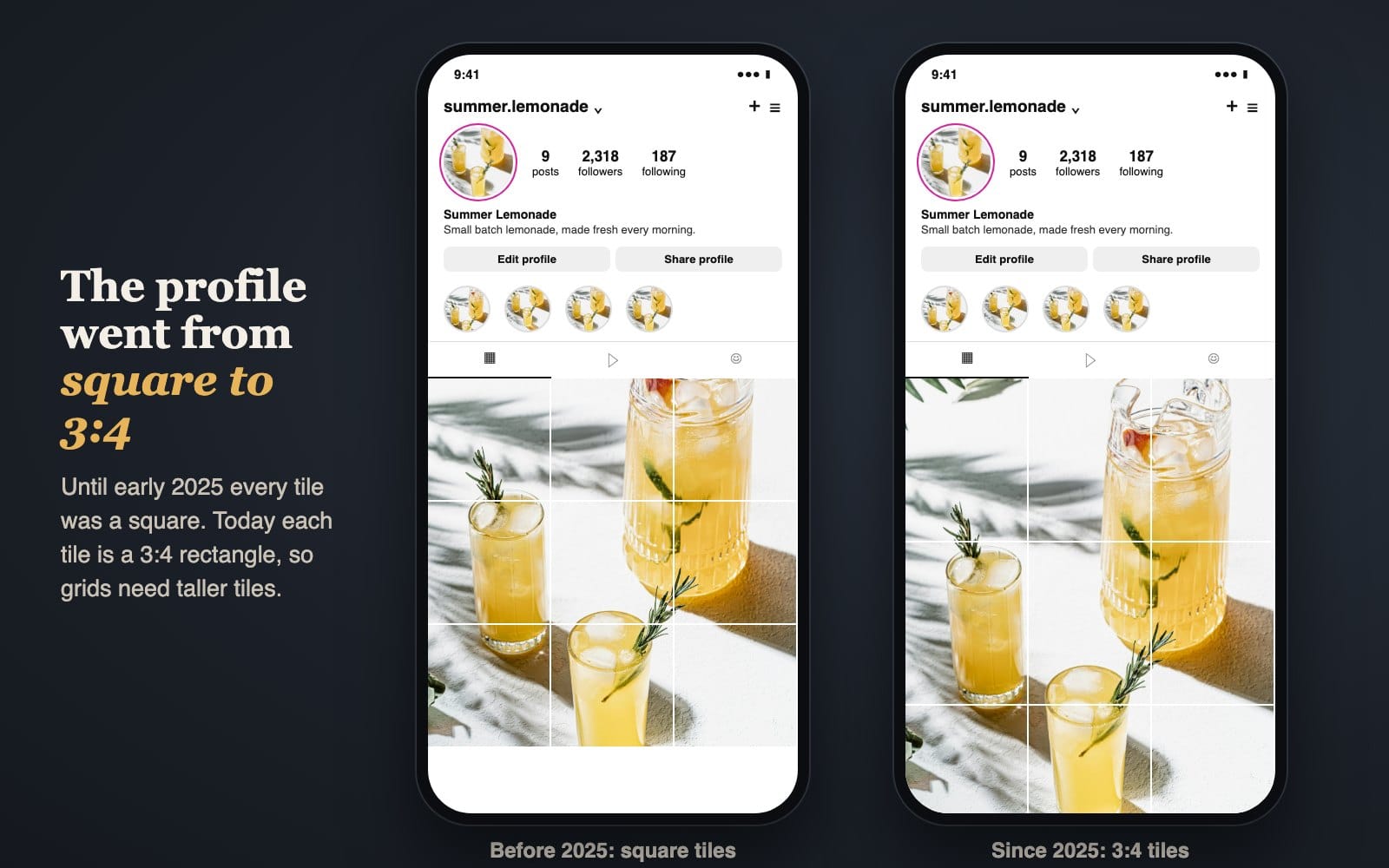
The same 3x3 on the old square profile (left) and today's 3:4 profile (right). These two views are illustrations built with the same lemonade photo.
A tile that fits the grid perfectly is 1080 x 1440 px. A full 3x3 image is 3240 x 4320 px, a 3x4 image is 3240 x 5760 px, and a one row banner is 3240 x 1440 px.
Tiles in 4:5 (1080 x 1350 px) still work, the profile just trims a thin strip from the left and right. Square tiles lose more. Either way, keep faces and text away from the cut lines and the outer edges.
How I tested the Instagram grid makers
I used one real photo, a summer lemonade shot with a glass jug and two glasses, cropped to 3:4.
A café owner would post exactly this kind of image to open a summer menu.
I split it as a 3x3 grid, posted the nine tiles to a live Instagram account on November 16, 2026, posted it again the old way as nine square tiles with one unrelated post in between, and checked the profile in a phone sized window and in a wide desktop window. I also ran the same photo through the SocialCal, RecurPost, Zoho and My Social Boutique previews. For every other tool I read the tool page and noted grid sizes, tile shape, account requirements and whether it can publish.
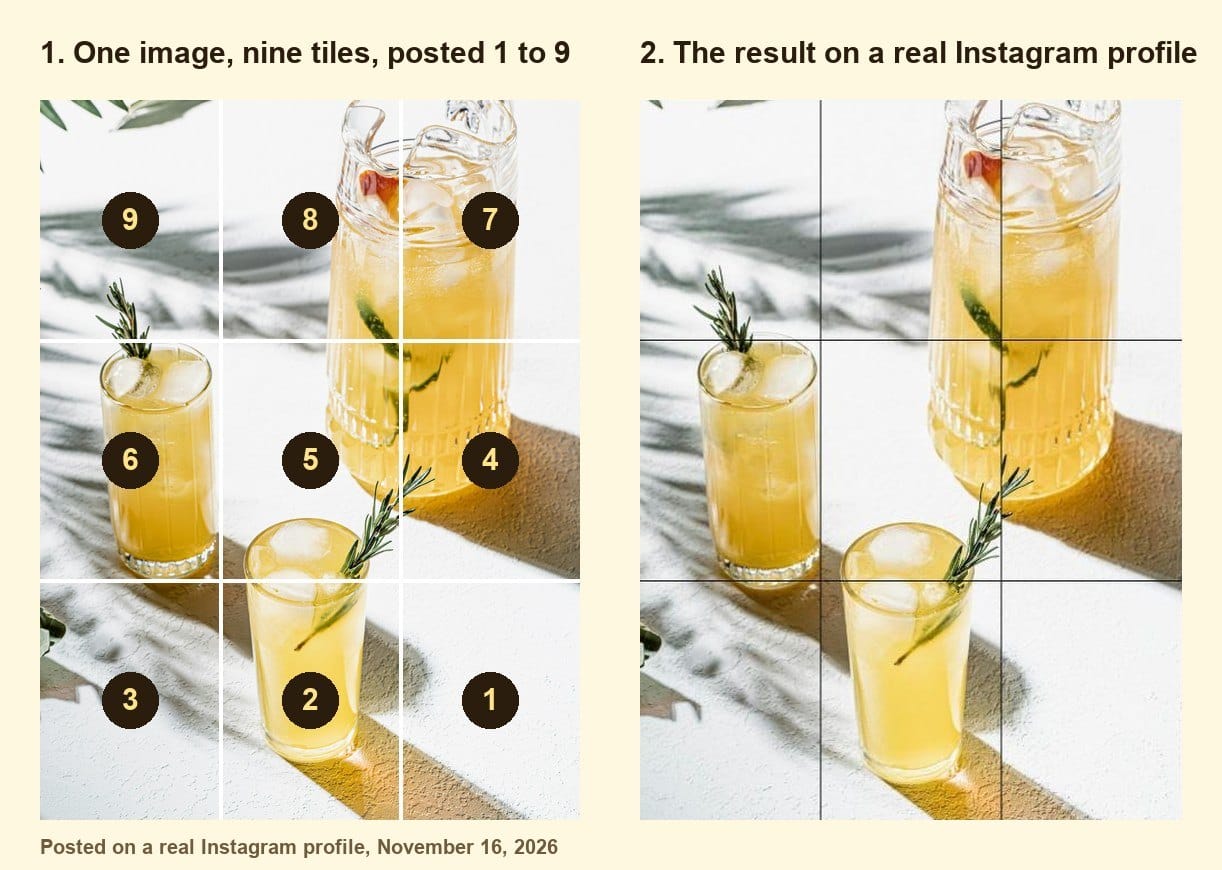
The test: one photo, nine posts, joined on a real profile on a phone.
Comparison table
| Tool | Grid sizes | Tile shape | Account | Posts for you |
|---|---|---|---|---|
| Circleboom Publish | 3x3, 3x4 | Lined up in test | Yes | Yes |
| SocialCal Splitter | 3x1, 3x2, 3x3 | 4:5 | No | No |
| RecurPost Generator | 2x2, 3x3, 4x4 | 4:5 | No | No |
| Zoho Grid Builder | 3x1 to 3x5 | Square | Not stated | No |
| My Social Boutique | 3x1 to 3x6 | 4:5 | Not stated | No |
| Canva | Templates | Any | Yes | No |
Grid sizes and tile shapes come from each tool's own page in November 2026. "Posts for you" means the tool publishes or schedules the tiles to Instagram in order; tools marked No give you a ZIP of images to post yourself. Circleboom Publish was the only tool tested on a live profile.

What each tile shape from the table looks like on today's profile. Illustration built with the same lemonade photo.
1. Circleboom Publish: split, preview and post in order
Circleboom Publish has a Grid Post option inside its Instagram composer. You pick 3x3 or 3x4, upload an image or pick one from Unsplash or Google Photos, move the crop frame, and it shows a mock profile with all the tiles in place before anything goes live.
Then it sends the tiles one after another, in the right order, now or at a scheduled time.
In my test the nine posts landed within a few minutes and joined cleanly on the phone.
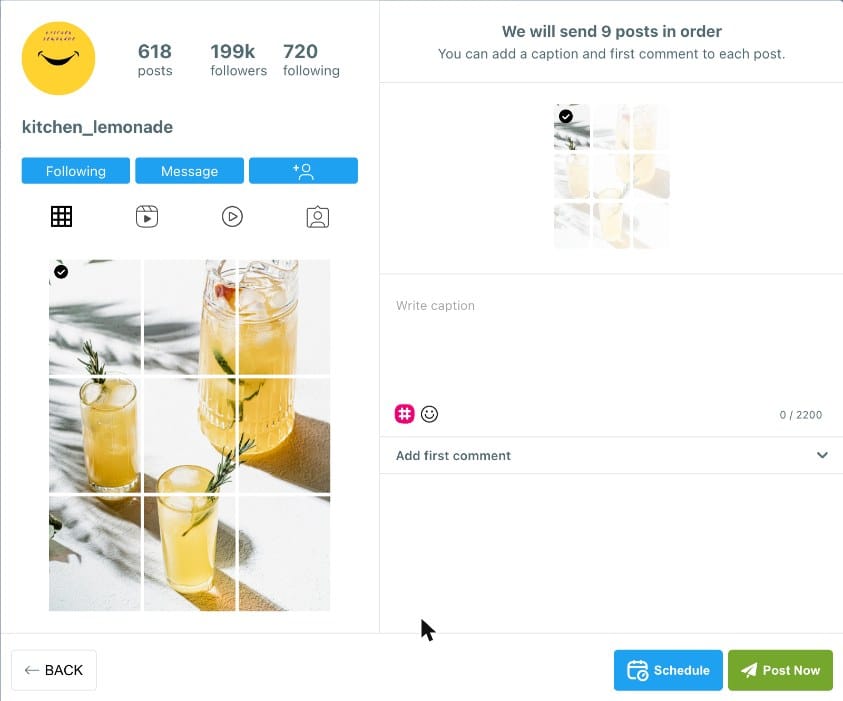
The preview step in Circleboom before the nine posts go out.
Best for: brands and social media managers who post grids for launches and want the order handled by the tool, see the Instagram grid maker in Circleboom Publish.
Keep in mind: splitting the image is free, but posting or scheduling the tiles needs the paid Instagram scheduler (90 days free). It offers 3x3 and 3x4, not banners or 2x2 layouts.
2. SocialCal Instagram Grid Splitter
SocialCal's Instagram grid splitter runs in the browser, needs no signup and adds no watermark. It cuts 3x1, 3x2 and 3x3 grids into 1080 x 1350 px tiles and shows a profile mockup before you download.
The ZIP includes an upload guide, with Grid 1 as the bottom right tile.

SocialCal numbers the tiles in posting order, with 1 at the bottom right.
Best for: a quick, free instagram grid splitter with a preview.
Keep in mind: no 3x4, and you post the tiles yourself.
3. RecurPost Instagram Grid Generator
RecurPost's free Instagram grid generator needs no account and processes the image in your browser. It crops every upload to 1080 x 1350 px first, then cuts 2x2, 3x3 or 4x4 grids into numbered PNGs.
That crop is the catch.
A 3x3 split from a 1080 x 1350 px image gives tiles of only 360 x 450 px, so each post is low resolution once someone taps it.

RecurPost crops my 3:4 photo to 4:5 before it cuts the grid.
Best for: fast experiments and mockups.
Keep in mind: small tiles, and 2x2 and 4x4 layouts do not line up on a three column profile.
4. Zoho Social Instagram Grid Builder
Zoho's Social Toolkit includes an Instagram grid builder with 3x1, 3x2, 3x3, 3x4 and 3x5 options, an optional colored frame, and a ZIP download where you choose the file name, format and quality.
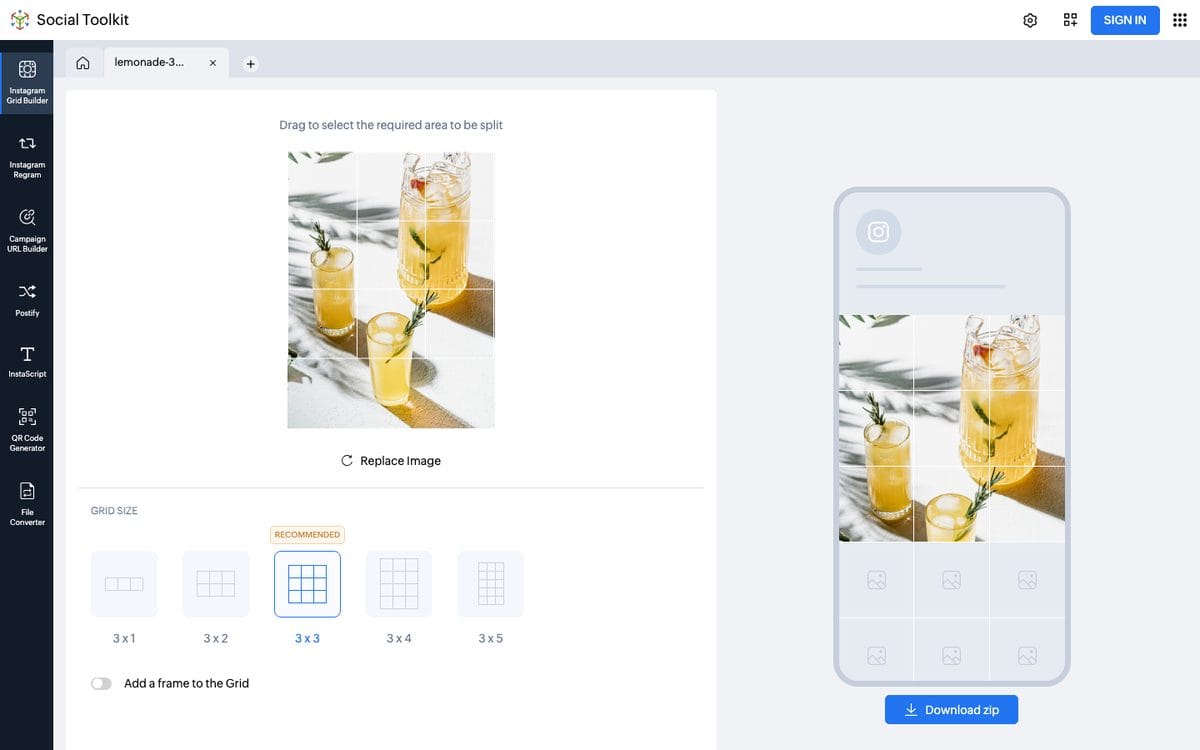
With 3x3 selected, Zoho's crop box covers a square area of my 3:4 photo.
Best for: anyone who wants a 3x4 split or framed tiles.
Keep in mind: its recommended sizes, such as 3240 x 3240 px for a 3x3, produce square tiles, so the 3:4 profile trims their sides.
5. My Social Boutique Grid Maker
My Social Boutique is mostly a shop for Canva templates, and its grid maker sits next to it. The tool splits an image into a grid or into carousel slides, works out the number of rows for you and supports layouts from 3x1 up to 3x6.
Its recommended sizes, such as 3240 x 4050 px for a 3x3, produce 4:5 tiles.
My 3:4 photo came out as nine 4:5 tiles plus a thin extra row of three.
Best for: tall grids of five or six rows.
Keep in mind: you download and post every tile yourself, and my 3:4 photo produced a thin extra row of three tiles, so start from a 4:5 image.
6. Canva grid templates
Most grid designs start in Canva, and that is where Canva shines: layouts, fonts and brand colors for the full image.
It is a design tool, not a splitter, so you still need one of the tools above to cut the image and post the tiles in order.

Canva's Instagram post templates are a starting point for the full grid image.
Best for: designing the image the grid is made from.
Keep in mind: set the canvas to 3240 x 4320 px for a 3x3 so it matches the profile.
The desktop surprise
Here is the part no tool page mentions.
On my test day, Instagram's website showed the profile four posts per row in a wide desktop window. The same nine tiles that lined up perfectly on the phone looked scrambled on a laptop.

The same nine posts on Instagram's website in a wide desktop window.
No grid maker can fix that.
Design and check your grid for the phone, because that is where it is meant to work. Two more things I found on the website: there was no option to pin posts or reorder the grid there, both live only in the app. Instagram's grid reordering, which arrived in June 2026, is the easiest way to fix a tile that landed in the wrong spot.
How to choose the right grid maker for Instagram
Ask three questions.
How often do you post grids? Once a year for a rebrand, a free browser splitter is enough. Every launch or every season, a tool that schedules the tiles in order saves real time: nine tiles posted by hand, in reverse, with captions, easily take 30 to 45 minutes, while a scheduled grid takes about five.
Which size do you need? A one row banner, a 3x3 or a 3x4? Only some tools cover all three.
Who posts the tiles? If several people share an account, a tool that publishes the sequence in one go stops a teammate's Reel from landing in the middle of your grid.
FAQ
Is there a free Instagram grid maker?
Yes. Circleboom's Instagram grid maker splits your image for free with a Circleboom account. Posting or scheduling the tiles in order is part of the paid Circleboom Instagram scheduler (90 days free). SocialCal's Grid Splitter and RecurPost's Grid Generator are free too and need no account, but both only give you images to post yourself.
What size should an Instagram grid image be in 2026?
For a perfect fit with the 3:4 profile, use 3240 x 4320 px for a 3x3 grid, 3240 x 5760 px for a 3x4 grid and 3240 x 1440 px for a one row banner. Each tile is then 1080 x 1440 px.
In what order do I post grid tiles?
Bottom right first, top left last, with nothing in between. Instagram puts every new post in the top left corner, so the reverse order rebuilds the picture.
Why does my Instagram grid look wrong on a computer?
In a wide desktop browser window, Instagram's website can show four posts per row, so a grid built for three columns breaks there. On the phone app it lines up.
Can an Instagram grid maker post the tiles for me?
Most free tools only download the tiles. Circleboom Publish is one of the tools that splits the image and posts or schedules every tile in order from the same screen.
Do 2x2 or 4x4 grids work on Instagram?
Not on the profile. The profile shows three posts per row, so a grid that is two or four tiles wide does not join into one picture. Use those layouts as carousel slides instead.
The short version
A grid maker that still cuts square tiles is fighting a profile that changed in 2025.
Pick one that fits the 3:4 grid, check the result on a phone, and let the tool handle the posting order if you post grids often.
The split takes seconds. The order is the real work.