
How to write a LinkedIn summary people actually read to the end
Write your LinkedIn summary in first person: a sharp opening, your role, proof, a human detail and a clear ask, in 2,600 characters.

Most About sections get skimmed for one line and closed. A few simple choices change that.
Write your LinkedIn summary in the About section as a short, first-person story of what you do, who you help and what you want next.Make the first sentence count, because it's the part people see before they expand the section.Cover your current role, your strongest results and a glimpse of your character.End by asking for what you want: a conversation, a project, a referral.
The walkthrough below covers the structure, the 2,600-character limit, and how to edit the section on any device.
What the LinkedIn summary is for
The LinkedIn summary is the About section of your profile. LinkedIn describes it as the place "where you can express your mission, motivation, and skills."
It's different from your headline. The headline is a label that follows you around LinkedIn, in search results, comments and messages. The About section is where someone who's already curious goes to understand you.
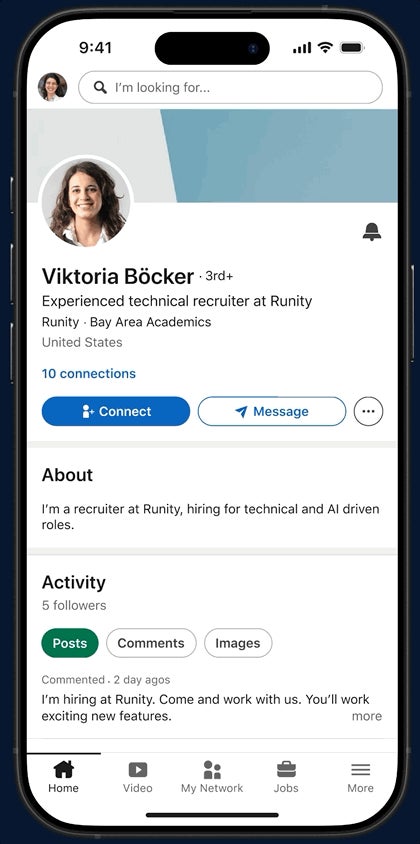
That changes how you write it. You're no longer trying to be found. You're trying to be understood, and then contacted.
A good summary answers three questions a visitor has: what do you do, why should I believe you're good at it, and what should I do about it?
How long a LinkedIn summary can be
LinkedIn's Talent Blog gives the limit as 2,600 characters, which is roughly 400 to 500 words.
You don't have to use all of it. LinkedIn's own profile advice page suggests keeping the text to one or two paragraphs, and says bullet points are fine.
In practice, most strong summaries land somewhere between those two. Long enough to tell a small story, short enough to read on a phone in under a minute.
Start with a first sentence that earns the click
Only the opening of your About section shows on your profile before a visitor has to expand it. LinkedIn's Talent Blog puts it simply: make your first sentence count.
Weak openings describe you in general terms:
- "Passionate professional with a proven track record."
- "Results-driven leader who loves challenges."
Strong openings say something specific:
- "I help small manufacturers cut energy costs without new equipment."
- "For eight years I've turned messy customer data into dashboards sales teams actually use."
The test is simple. If the sentence could sit on a thousand other profiles, rewrite it.
A simple structure for your LinkedIn summary
You can build almost any good summary from five short parts. Keep each to a few sentences.
1. The opening: what you do and for whom
One or two sentences naming the work and the people it serves. This is the line from the section above.
2. Your present role
What you do now, in plain words. Skip the job-description language. "I run a four-person team that ships the company's mobile app" beats "Responsible for cross-functional mobile delivery."
3. How you got here
A sentence or two framing your past. Not a list of every job; the thread that connects them. "I started in customer support, which is why I build products around the questions users actually ask."
4. Proof
Two or three results, with numbers where you have them. Bullet points work well here, because a reader's eye jumps to them.
5. The ask
Tell the reader what to do next. This is the step most summaries leave out.
Show results, not responsibilities
The middle of a summary is where most people drift into duties: "managed," "oversaw," "was responsible for."
Results read differently:
- "Cut onboarding time from three weeks to eight days."
- "Grew the newsletter from 2,000 to 19,000 subscribers."
- "Led the migration of 40 client sites with zero downtime."
You don't need huge numbers. You need specific ones. A small, precise result is more believable than a vague big one.
If your work is hard to quantify, describe the before and after instead. "Took over a support queue with a two-week backlog and cleared it within a month" tells the story without a percentage.
Let some personality in
LinkedIn's Talent Blog lists "reveal your character" and "show life outside of work" among its best practices. A line or two helps people remember you as a person, not a résumé.
That doesn't mean your life story. One detail is enough:
- A side project that connects to your work.
- What you do at weekends, if it says something about you.
- Why you chose this field in the first place.
This is also where writing how you speak pays off. Read the summary aloud. If it sounds like something you'd never say to a colleague over coffee, loosen it.
Write in the first person
Use "I," not your own name in the third person.
"Sarah is a seasoned marketing executive" reads like a press release someone else wrote. "I run marketing for a growing software company" reads like you.
LinkedIn's summary advice recommends the first person for exactly this reason. It's your profile, and visitors know you wrote it.
Use the words people search for
The About section is part of your profile text, so its words help LinkedIn match you to searches.
LinkedIn's Talent Blog frames this as "pump the keywords," balanced with "cut the jargon." Both matter:
- Use the actual terms for your skills and field, the ones a recruiter or client would type.
- Drop internal jargon and acronyms only your current company understands.
Work the terms into sentences naturally. A comma-separated list of skills at the bottom reads as filler, and your Skills section already exists for that.
End by asking for what you want
This is the part almost everyone skips, and it's the one that turns a visit into a message.
Examples of clear asks:
- "If you're hiring for a data role in healthcare, I'd like to talk."
- "I take on two new consulting clients a quarter. Message me here."
- "Always happy to swap notes with other product designers."
Pick one ask, not three. And make it match what you actually want from LinkedIn right now.
Formatting that makes it easy to read
A wall of text loses people on a phone screen. LinkedIn's Talent Blog advises creating white space and steering clear of long paragraphs.
A few simple rules:
- Keep paragraphs to two or three sentences.
- Use bullet points for results or services.
- Leave a blank line between sections.
Go easy on special characters and emojis. LinkedIn's own advice is to lay off them. A single simple bullet symbol is fine; a row of icons looks cluttered and can be hard for screen readers.
How to edit your About section
On a computer:
- Click Me, then View Profile.
- Scroll to the About section and click the Edit icon.
- Write or paste your text in the Edit about pop-up.
- Click Save.
In the LinkedIn app, tap your profile picture, tap it again to open your profile, then tap the Edit icon on the About section. Make your changes on the Edit about page and tap Save.
LinkedIn's help page on editing the About section adds one troubleshooting tip. If your changes don't show, check that you're editing the right language version of your profile.
Draft it outside LinkedIn first
Writing straight into the Edit about box is how summaries end up rushed.
Draft in a notes app or document instead. You can see the whole thing at once, check the length, and come back to it the next day with fresh eyes.
Then paste it in and view your profile as a visitor would. Check where the text cuts off before "see more." If the visible part doesn't make someone want to expand it, the opening needs another pass.
LinkedIn summary examples to learn from
Reading good examples is the fastest way to find your own style.
You'll notice most strong ones follow the same shape: a sharp opening, a few concrete results, a human detail and a clear ask.
For a range of approaches across fields, see these LinkedIn profile examples and note what each About section does in its first line.
Borrow the structure, never the sentences. A copied summary sounds wrong the moment someone meets you.
Your LinkedIn summary checklist
Before you save, check that your summary:
- Opens with a specific sentence about what you do and for whom.
- Describes your current role in plain words.
- Shows two or three concrete results.
- Includes one human detail.
- Ends with a single, clear ask.
Then read it aloud once. If it sounds like you talking, it's ready.
About section questions
Should my LinkedIn summary be different from my resume?
Yes. A resume lists what you did; the About section explains who you are and what you want next, in your own voice. They should agree on facts but not read the same.
How often should I update my LinkedIn summary?
Whenever your focus changes: a new role, a new service, or a new goal such as job hunting. The ask at the end in particular should always match what you want now.
Is a recommendation part of my summary?
No. Recommendations are a separate section that other members write about you. They support your summary with outside proof, so it's worth asking a former manager or client for one.