How to create a business page on LinkedIn: page types and who can set one up
Not sure where to start? Create a business page on LinkedIn from For Business, Create a Company Page, then choose a Page type.


Most people searching for a LinkedIn business page hit the same wall: there's no button with that name. LinkedIn calls it a Page, and the button says Company Page.
To create a business page on LinkedIn, click the For Business icon on your homepage, scroll down, and choose Create a Company Page. Pick a Page type (Company, Showcase page or Educational institution), fill in the details, confirm you're allowed to act for the organization, and click Create page. It's free, but it only works on desktop or the iOS app, not on Android.
Below: which Page type to choose, who is allowed to create one, and what to check before you start.
What LinkedIn calls a business page
LinkedIn doesn't use the phrase "business page" anywhere in its menus. The official name is a LinkedIn Page, and the creation button reads Create a Company Page.
It's the same thing. A LinkedIn Page is the profile for an organization, as opposed to your personal profile, which is the profile for you.

Knowing the name saves time. Searching LinkedIn's help center for "LinkedIn Page" gets you to the right instructions faster than "business page" does.
How to create a business page on LinkedIn from a computer
- Click the For Business icon in the upper right of your LinkedIn homepage.
- Scroll down and click Create a Company Page.
- Select the Page type: Company, Showcase page or Educational institution.
- Fill in the details, tick the verification box, and click Create page.
LinkedIn's page on creating a LinkedIn Page shows the same route, ending with a Start building your page! prompt.
The form in step 4 is split into Page identity, Company or Institution details, and Profile details. You can refine most of it after the Page is live.
How to create a LinkedIn business page on an iPhone
The iOS app starts somewhere else: from any existing LinkedIn Page.
Go to any LinkedIn Page, tap the More icon, and choose Create a LinkedIn Page. Pick Company or Educational institution, fill in the form, tick the verification box, and tap Create.
Note what's missing: the iOS app doesn't offer the Showcase page type. If that's the one you need, use a computer.
Can you create a LinkedIn business page on Android?
No. LinkedIn says creating a LinkedIn Page is not supported on Android mobile devices.
That catches plenty of small-business owners who run everything from their phone. The fix is simple: open LinkedIn in a desktop browser, or use an iPhone if one's to hand.
LinkedIn's note is specifically about creating a Page, so plan the setup for a moment when a computer is nearby.
Which LinkedIn page type to choose for your business
The Page type is the first real decision, and it shapes everything after it.
- Company: the right choice for almost every business, from a one-person consultancy to a large firm.
- Educational institution: for schools, colleges and universities.
- Showcase page: an extra Page for a distinct brand, product line or initiative that deserves its own audience.
If you're setting up your business on LinkedIn for the first time, pick Company. The third type is an extra, and most organizations never need one.
When a separate page for one brand makes sense
That extra Page is worth it when part of your organization speaks to a different audience from the rest.
A software company with a separate consumer app, or a firm with a well-known event series, are typical examples. Followers who care about that one thing can follow it without the rest.
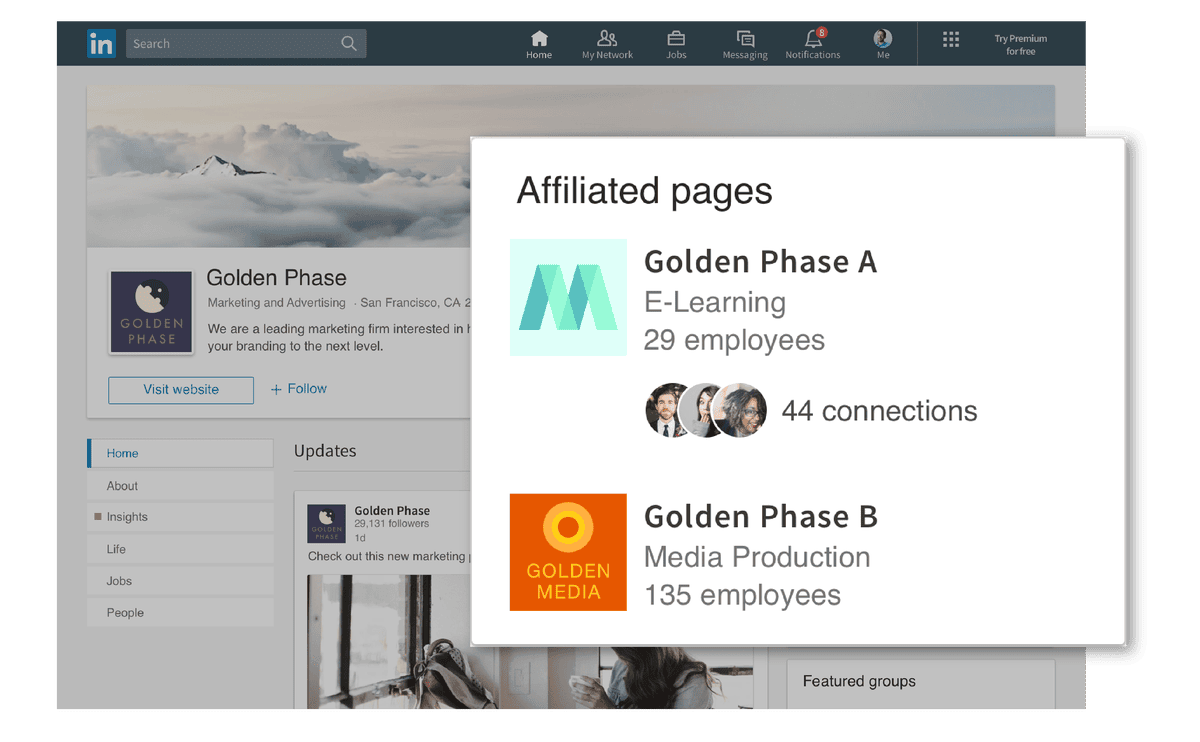
If you're not sure, you don't need one. Splitting a small audience across two Pages usually leaves both of them quiet.
Who can create a LinkedIn business page
Anyone with a LinkedIn account can start the process, but not everyone should finish it.
The form ends with a verification box, where you confirm you have the right to act on behalf of the company or school.
In practice, that means you're the owner, a founder, or someone the organization has asked to manage its presence. Creating a Page for a business you don't represent is exactly what that box is there to stop.
LinkedIn's Page best practices add a few account basics:
- A profile under your real name.
- A confirmed email address.
- Enough connections that your own account looks established.
Check whether your business already has a LinkedIn page
Before you create anything, search LinkedIn for your organization's name. Duplicate Pages confuse customers and split your followers.
If a Page already exists and someone at your organization runs it, ask them to add you as an admin rather than starting over.
If what you find is a basic Listing Page that nobody manages, LinkedIn lets you claim it. That's usually better than creating a new Page next to it, since people may already be following the existing one.
Creating a LinkedIn page for a client or employer
Agencies, freelancers and marketing staff often set up Pages for someone else. That's allowed when you genuinely act for the organization, which is what the verification box asks you to confirm.
Two habits prevent trouble later:
- Get the go-ahead in writing from the owner before you tick the box.
- Plan the handover, since the creator becomes super admin and the client will want control of their own Page.
If the client has a LinkedIn account and ten spare minutes, the cleanest option is for them to create the Page themselves. They can then add you to help run it, and nobody has to untangle access when the contract ends.
Do you need a personal profile to create a business page?
Yes. You must have a LinkedIn account to create a Page, and the Page is created from that account.
There's no separate business login. Your personal profile is how you get in, and it's how LinkedIn knows who's responsible for the Page.
That's also why the best practices ask for a real-name profile. A Page created from an obviously fake or empty account is harder for anyone to trust.
What a LinkedIn business page costs
Creating a LinkedIn Page is free. You don't need a paid plan to set one up.
Paid options exist elsewhere on LinkedIn, such as ads and Premium plans. None of them is required to have a Page.
So the real cost is time: filling in the details properly and posting often enough that the Page looks alive.
What happens once you click Create page
The person who creates the Page becomes its super admin, LinkedIn's top admin role for that Page.
Think about that before a freelancer or junior colleague sets up your Page for you. It's easier to create it from the owner's account from the start than to sort out access later.
After creation, LinkedIn shows Start building your page! That's your cue to finish the parts the short form didn't cover, like the logo and cover image.
Business page or personal profile: which one do you need?
They do different jobs, and most businesses on LinkedIn use both.
Your personal profile is where people connect with you, message you and see your career. A Page is where people follow your organization, find its website and see its updates.
If you're a solo freelancer and your name is the brand, your profile may carry most of the weight at first. The moment you have a business name customers search for, a Page is worth creating.
What to do after your business page is live
A new Page with no followers and no posts doesn't do much on its own. The next step is getting it in front of people who'd care.
Invite relevant connections to follow it, post regularly, and list the business in your own Experience section so profile visitors can find it.
For a fuller plan, the ways to promote your business on LinkedIn pick up where creation leaves off.
Which business page path fits your situation
Work through it in order:
- Your organization already has a Page? Ask its admin to add you. Don't create a second one.
- You found an unmanaged Listing Page? Claim it.
- You're a school or university? Create an Educational institution Page.
- You're a business with no Page yet? Create a Company Page from desktop or iOS.
- You have a distinct brand or initiative with its own audience? Consider the extra brand Page type, from desktop.
Pick your branch, open LinkedIn on a computer, and click For Business to start.
Business Page questions
Can I create more than one LinkedIn Page?
You can create Pages for organizations you're authorized to represent, and there's a separate Page type for a distinct brand or initiative. For one business, stick to one main Page.
Why can't I find Create a Company Page in the app?
On iPhone, start from any LinkedIn Page, tap More, then Create a LinkedIn Page. On Android, creating a Page isn't supported, so use a computer.
Is a LinkedIn Page the same as a Company Page?
Yes. LinkedIn uses LinkedIn Page as the general name, and the button to create one reads Create a Company Page.