
What is LinkedIn InMail, and how do InMail credits work?
What is LinkedIn InMail? A Premium message you can send to members you aren't connected to, paid for with monthly credits.

InMail is LinkedIn's paid door to people outside your network, and every message you send through it costs a credit.
LinkedIn InMail is a Premium messaging feature that lets you message a LinkedIn member you're not connected to. Each InMail uses a credit from your plan's monthly allowance, and you get the credit back if the recipient accepts, declines or replies within 90 days. Basic members can only message their connections.
Below: how many credits each plan includes, when they expire, who you can't reach, and how to write an InMail that earns its credit back.
What InMail is on LinkedIn
A normal LinkedIn message goes to a connection. InMail goes to someone you're not connected to.
LinkedIn's page on InMail messages describes it as a way to directly message another LinkedIn member you're not connected to. It's a Premium feature, so a free account can't send one.
That's the whole idea. InMail replaces the step of sending a connection request and waiting for an accept, when the person is someone you need to reach now.
InMail versus a regular LinkedIn message
The two look similar in your inbox, but they work differently:
- A regular message goes to your 1st-degree connections, and it's free on any account.
- An InMail goes to members outside your connections, and it uses a credit.
- An InMail can carry a subject line, up to 200 characters. It's optional.
There's one more difference senders notice. LinkedIn says read receipts and typing indicators don't appear to senders of InMail messages, so you won't see when an InMail is read.
Who can send LinkedIn InMail
Only members on a paid plan that includes InMail credits. LinkedIn is plain about the alternative: Basic members can only message their connections.
The plans that include InMail range from Premium Career, aimed at job seekers, to Sales Navigator and Recruiter Lite, built for sales and hiring.
If you're on a free account and need to reach someone outside your network, your options are a connection request with a note, or a free message to someone with Open Profile, covered below.
How many InMail credits each plan includes
LinkedIn's page on InMail credits and renewal lists monthly allowances by plan:
- Premium Career: 5 credits a month.
- Premium Business: 15 a month.
- Sales Navigator Core: 50 a month.
- Recruiter Lite: 30 a month.
- Premium All-in-One: 30 a month, up to 90 in total.
Hiring Pro works differently, with 5 credits per job.
The spread is large. A job seeker gets a handful of messages a month, while a sales plan gets ten times as many.
How many InMail credits you can save up
Unused credits roll over, but only up to a ceiling. LinkedIn sets these accumulation caps:
- Premium Career: 15.
- Premium Business: 45.
- Sales Navigator: 150.
- Recruiter Lite: 120.
Once you hit the cap, new monthly credits don't add to the total. If you're sitting near your limit, use some before the next renewal rather than letting the month's allowance go to waste.
When you get an InMail credit back
This is the rule that makes InMail cheaper than it looks. LinkedIn says an InMail that is accepted, declined or responded to directly within 90 days of being sent is credited back.
Notice the word "declined." The recipient doesn't have to say yes for you to get the credit back. They only have to respond in some way.
LinkedIn also counts Quick Replies as a response. A one-tap quick reply still returns your credit.
So the credits you actually lose are the ones sent to people who never react at all. That makes the quality of the message, not the volume, what decides your real cost.
When InMail credits expire and renew
Credits aren't permanent. LinkedIn's InMail FAQ sets out the rules:
- Credits expire after 90 days.
- New credits arrive on the first day of your billing cycle.
- Credits can't be bought separately.
- There's no unlimited InMail plan.
If you need more InMail than your plan allows, the only route is a plan with a bigger allowance. You can't top up.
Who you can't reach with InMail
InMail doesn't open every inbox. LinkedIn says you can't InMail members who have opted out of receiving it.
The flip side is Open Profile. Members who've turned on Open Profile can be messaged for free, without using a credit.
That's worth checking before you spend one. If the person you want has Open Profile on, the message costs nothing.
How to send an InMail on LinkedIn
LinkedIn's page on sending an InMail gives the route.
On a computer:
- Open the member's profile.
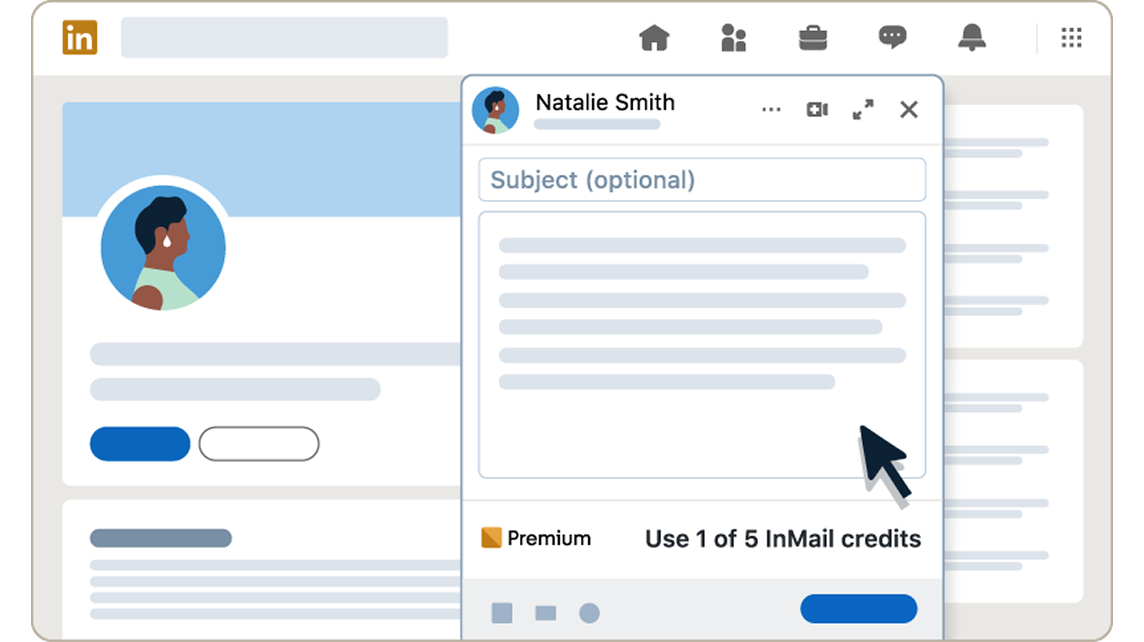
- Click More, then Message [Name].
- Add a subject if you want one, then write your message.
- Send it.
In the app, open the profile and tap Message.
Keep an eye on your credit balance before you send. Once it reaches zero, you'll have to wait for the next billing cycle.
InMail length limits
LinkedIn caps both parts of the message:
- Subject line: up to 200 characters.
- Message body: up to 2,000 characters.
In practice, you'll rarely want to use all 2,000. A message that fits on one phone screen tends to get read to the end.
You can't send a second InMail until they respond
InMail isn't built for follow-up chains. LinkedIn says you can't send a second InMail to the same person until they respond.
LinkedIn does send an automatic reminder within three days. You don't have to write the nudge yourself.
That makes your first message your only real shot. Write it as if there won't be a second one, because there usually won't be.
What happens to InMail credits when you cancel or change plans
Credits are tied to the plan that gave them to you. LinkedIn's rules:
- Cancel Premium, and your credits are lost.
- Upgrade to another plan, and your credits don't transfer.
- Premium credits can't be used in Sales Navigator or Recruiter.
So if you're about to cancel or switch, spend the credits you have first. Send the messages you were planning while the balance still exists.
InMail or a connection request with a note?
For people who are 2nd or 3rd-degree connections, a connection request is the free alternative. It has limits of its own.
On a free account, LinkedIn caps invitation notes at 200 characters, and you can personalize up to three connection requests a month. Premium members get unlimited personalized invitations.
The two tools suit different jobs:
- A connection request suits people you want an ongoing link with, where a short note is enough.
- An InMail suits a longer, time-sensitive message to someone you may never connect with.
Many people use both: an InMail to start the conversation, then a connection request once the person has replied.
What it means when someone sends you an InMail
InMail works in both directions, so you'll likely receive a few.
An InMail tells you the sender paid, or used a plan's allowance, to reach you. That doesn't make every one worth your time, but it usually means the sender had a specific reason.
Replying, even briefly, helps the sender. Any response within 90 days returns their credit, so a quick "not for me, thanks" costs you seconds and saves them a message.
If you'd rather not receive InMail at all, LinkedIn lets members opt out of it. Senders then can't reach you this way.
How to write an InMail that earns its credit back
Because a reply of any kind returns the credit, a good InMail is one that's easy to answer, even with a no.
A few things help:
- Say why you're writing to this person specifically, in the first line.
- Ask one clear question they can answer quickly.
- Keep it short, well under the 2,000-character limit.
- Use the subject line to state the reason, not to tease it.
A message that asks for nothing gets ignored, and an ignored InMail is the only kind that costs you. A clear yes-or-no question is kinder to the reader and cheaper for you.
When InMail is worth a credit
InMail makes sense when the person is genuinely out of reach any other way: no shared connections, no Open Profile, and a time-sensitive reason to write.
It's a poor fit for people you could reach with a connection request and a short note, or through a mutual connection's introduction. Those routes are free, and they often start the relationship on warmer terms.
Save credits for the few messages where speed or distance matters. That's what they're for.
InMail, in one line
InMail is a paid pass to one inbox you couldn't otherwise reach, and LinkedIn refunds it the moment the person answers. Write something worth answering, and it costs you nothing.
InMail questions people ask
Does LinkedIn tell me when my InMail is read?
No. LinkedIn says read receipts don't appear to senders of InMail messages, whatever either person's settings are.
Can I buy extra InMail credits?
No. LinkedIn says InMail credits can't be purchased separately. More credits means a plan with a larger monthly allowance.
Do InMail credits carry over to next month?
Yes, up to your plan's accumulation cap, but each credit expires 90 days after you receive it.