How to tell if you were blocked on LinkedIn, and what else it could be
Blocked on LinkedIn? LinkedIn never says. Their profile won't load and you're disconnected, but closed or hibernated accounts look the same.

A profile you used to visit won't load, your message thread with them has gone quiet, and they've vanished from your connections. The natural conclusion is a block.
Sometimes it's right.
How can I tell if someone blocked me on LinkedIn?
LinkedIn doesn't tell you and offers no official way to check. The signs are indirect: their profile won't open for you while you're signed in, you can't message them, and you're no longer connected, yet a hibernated, removed or closed account can look exactly the same.
Below: each sign, the other explanations that mimic a block, and what you can and can't do about it.
Why LinkedIn never confirms a block
A block on LinkedIn is silent by design. LinkedIn says the blocked member won't receive any notification of the action.
Its block overview adds "in most cases", tied to rare shared-account situations. For ordinary members, nothing is sent.
There's also no page, list or setting that shows who has blocked you. You'll only ever see the effects. That's why every method in this article is a sign, never proof.
What a block changes for the person who was blocked
To read the signs, it helps to know what a block actually does. LinkedIn lists the effects, and they apply both ways:
- You can't access each other's profiles, or see each other's shared content.
- You can't message each other.
- If you were connected, you aren't anymore.
- You stop appearing in each other's Who's Viewed Your Profile lists.
- Endorsements and recommendations between you are removed.
LinkedIn also stops suggesting you to each other in features such as People You May Know and People also Viewed. You aren't notified about their LinkedIn Events either.
Sign 1: their profile won't open when you're signed in
This is the sign most people notice first. You search their name and they don't appear, or a saved link to their profile no longer loads.
On its own, it fits a block. It also fits three other situations, which is why it can't settle the question alone.
Note what happened instead of an open profile, and the rough date you first noticed it. If later signs line up with that date, the picture gets clearer.
Sign 2: they're gone from your connections
Blocking disconnects you. LinkedIn says that if you're connected when someone blocks you, you won't be connected anymore.
So if a person you know was a connection has disappeared from your list, a block is one possibility.
They may also have simply removed you as a connection, which is a quieter step and doesn't block anything.
The difference shows up in the next sign. A removed connection can usually still be found and viewed. A blocker can't.
Sign 3: you can't message them
A block stops messaging in both directions. The conversation you had doesn't continue, and you have no way to send a new message on LinkedIn.
If you can still open their profile while signed in, you haven't been blocked, whatever else has changed. That's the most useful ruling-out test you have.
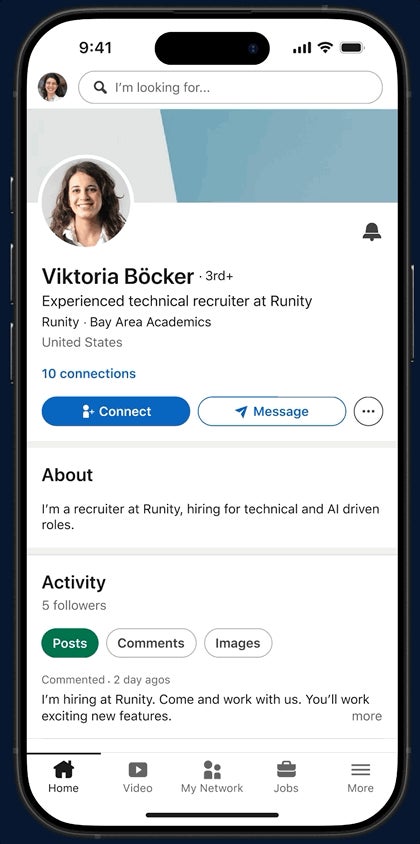
If neither their profile nor messaging works, the other signs start to matter more.
Sign 4: they no longer appear anywhere around you
The quieter effects add up over time. After a block, the other person stops showing in your Who's Viewed Your Profile list, and LinkedIn stops suggesting them in People You May Know.
Endorsements they gave you disappear. A recommendation they wrote for you is removed from your profile.
That last one is the strongest single clue. A recommendation vanishing at the same time the profile stopped loading is hard to explain any other way, though LinkedIn still won't confirm it.
Why a missing profile doesn't prove you were blocked
LinkedIn's help center lists several reasons you might not be able to find a member. Blocking is only one of them.
The member may have:
- Hibernated their profile.
- Been removed from the site due to abusive behavior.
- Blocked you.
- Closed their account.
From your side, all four can look almost identical. A profile that won't load tells you something changed, not what changed. Treat it as a question, not an answer.
The logged-out check, and its limits
There's one check you can run, though LinkedIn never presents it as a test.
LinkedIn's page on blocking a member notes that a blocked member may still see information made public, such as a public profile. So a public profile can stay reachable when you're signed out.
If their public profile opens in a private browser window where you're signed out, but not when you're signed in, the account still exists and is public. That pattern fits a block.
The limits are real. If they have no public profile, the check shows nothing either way.
How to rule out a closed or hibernated account
The key question is whether the account still exists for other people. Two practical ways to find out:
- Run the logged-out check above. A public profile that opens means the account is live.
- Ask a mutual contact whether they can still see the profile, if you have a natural reason to ask.
If the profile is gone for everyone, the account is closed, hibernated or removed. If it's there for others but not for you, a block is the likely reason.
Keep the second check low-key. Asking around about a block rarely ends well.
Skip the "who blocked me" apps
Search for this topic and you'll find sites and browser extensions that promise a list of everyone who blocked you on LinkedIn.
LinkedIn itself keeps no such list for you to see. It shows the blocker their own Blocking list, and shows you nothing. A tool can only guess from the same signs described here.
Some of these tools ask for your LinkedIn password or broad access to your browser. That's a real risk to your account in exchange for a guess you can make yourself in two minutes.
What you can't do about a block
Only the person who blocked you can remove it. LinkedIn documents no appeal, request or setting on your side.
The unblock button lives only in their settings. LinkedIn also makes them wait 48 hours after an unblock before they can block the same person again.
None of that is visible or controllable from your account.
So once you're fairly sure, the decision is really about what you do next, not about undoing it.
What you can still see of theirs
A block restricts what you see while signed in. It doesn't erase the other person from the internet.
Their public profile, public group discussions and public posts may still reach you, for example if a mutual connection reshares something.
That can be confusing. Seeing their post in your feed through someone else's share doesn't mean the block has ended.
Should you contact them another way?
Usually, no.
A block is a clear signal that the person wants no contact on LinkedIn, and reaching out elsewhere to ask why tends to make things worse.
There are exceptions. If you work together, share a client, or need something for a legitimate business reason, use the normal work channel and keep it strictly to that business.
If there was no real relationship, let it go.
People block for all sorts of reasons, including a mistaken tap or simple inbox fatigue, and many of those reasons have nothing to do with you.
Were you blocked by mistake?
It happens. Someone clears out spam, taps the wrong name, or blocks in a moment of frustration and forgets.
If you have a genuine working relationship and another way to reach them, a brief, neutral message is fine: you noticed you can't find their profile, and you wanted to check they're okay to stay in touch.
Then leave the decision with them. If they don't answer, take that as the answer.
Blocked, closed or something else: how to decide
Work through the signs in order:
- You can still open their profile while signed in? You're not blocked.
- Their profile won't load for anyone, even signed out? Likely closed, hibernated or removed.
- It loads signed out but not signed in, and you're disconnected? A block is the likely reason.
- A recommendation or endorsement from them has also vanished? That strengthens the block explanation.
Whichever branch you land on, the next step is the same: respect the distance and put your energy into the connections that are still there.
Common questions about being blocked
Does LinkedIn notify you when someone blocks you?
No. LinkedIn says the blocked member won't receive any notification. You'll only notice the effects, such as a profile that no longer loads.
Can someone who blocked me still see my profile?
Not while they're signed in, since a block stops profile access both ways. Public information, such as a public profile, may still be visible to them when signed out.
Will I find out if they unblock me?
LinkedIn doesn't describe any notice for an unblock. You'd notice their profile loading again, but LinkedIn doesn't say your connection comes back, so expect to be separate members.