How to block someone on Instagram, and what the block actually does
Someone crossing a line? Block someone on Instagram from their profile: tap the three dots, tap Block, and pick how far the block reaches.

A block is the strongest step Instagram gives you against another account. It's silent, it's reversible, and it reaches further than most people expect, including accounts that person hasn't created yet.
How do you block someone on Instagram?
Go to their profile, tap the three dots in the top-right corner and select Block. Instagram asks whether to block just that account, or also any other accounts they have or create later. Confirm, and they can no longer find your profile, posts or stories in search, can't message you, and their earlier likes and comments on your posts are removed.
Below: every way to block, what the other person experiences, how to undo it, and the lighter options when a block feels like too much.
How to block someone on Instagram from their profile
The profile route is the one most people use, and Instagram's page on blocking someone lays it out:
- Go to their profile. Tap their username on a post or story, or search for it.
- Tap the three dots (Options) in the top right.
- Tap Block.
- Choose the reach of the block, then tap Block at the bottom to confirm.
That's it. Instagram doesn't notify the person, and the change takes effect straight away.
Choose how far the block reaches
Step 4 is the part people rush past, and it's the most important choice. Instagram's page on what happens when you block someone explains the two options:
- Block just this account.
- Block this account and other existing accounts they may have, or accounts they may create.
The wider option is built for people who come back with a new profile after being blocked. It saves you blocking a string of accounts one by one.
In newer versions of the app, you may not see a choice at all. Instagram's page on blocking someone says that blocking from the Instagram app blocks the account, other existing accounts they may have, and any new accounts they may create, so the wider block is applied for you.
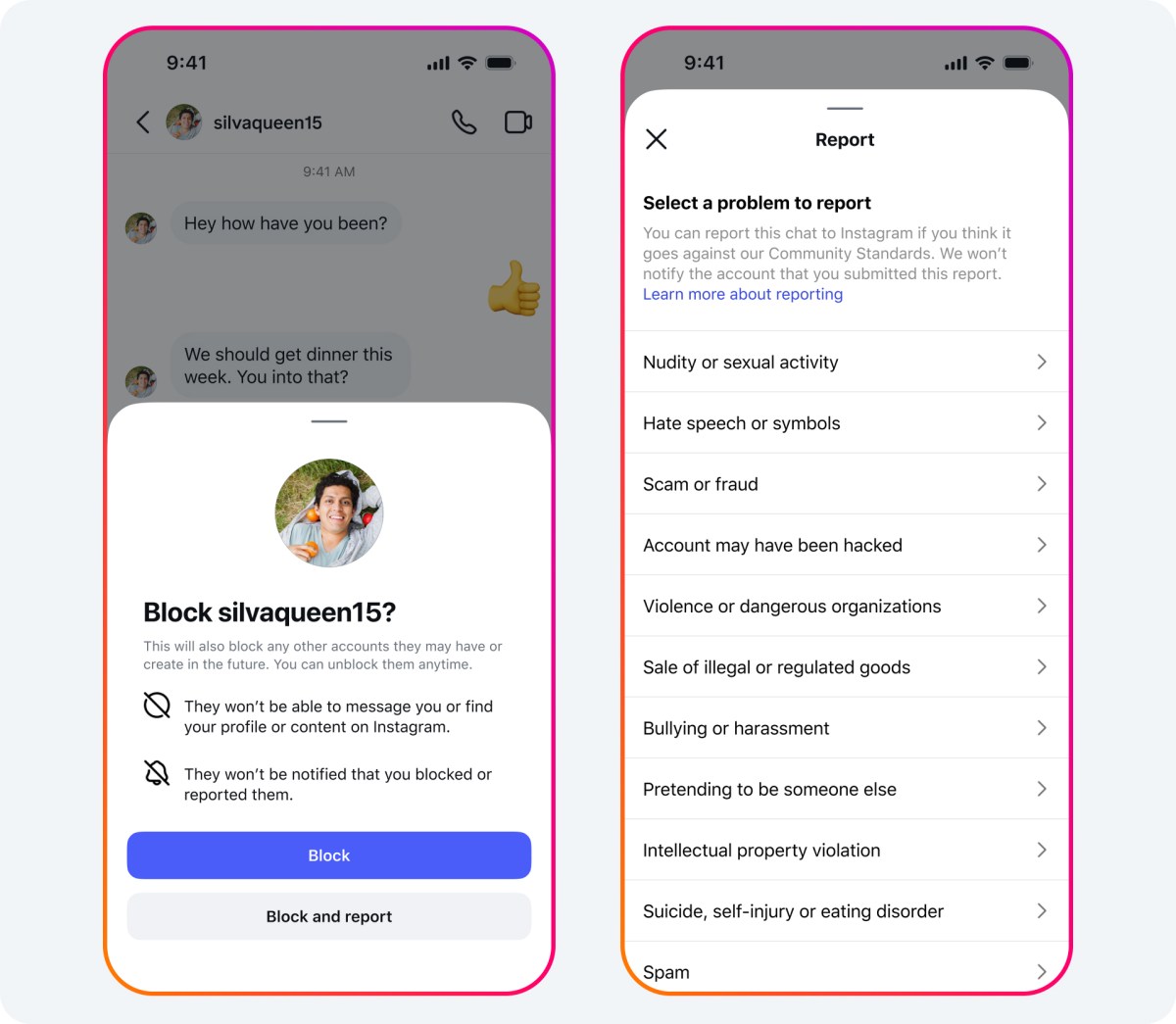
There's one gap to know about. Instagram says that if you're already following other accounts owned by the same person, the wider block doesn't cover those; you'll need to block each of them individually.
If you're blocking someone for your safety, choose the wider option.
Other ways to block someone on Instagram
You don't have to visit a profile. Instagram offers two more routes.
From a chat
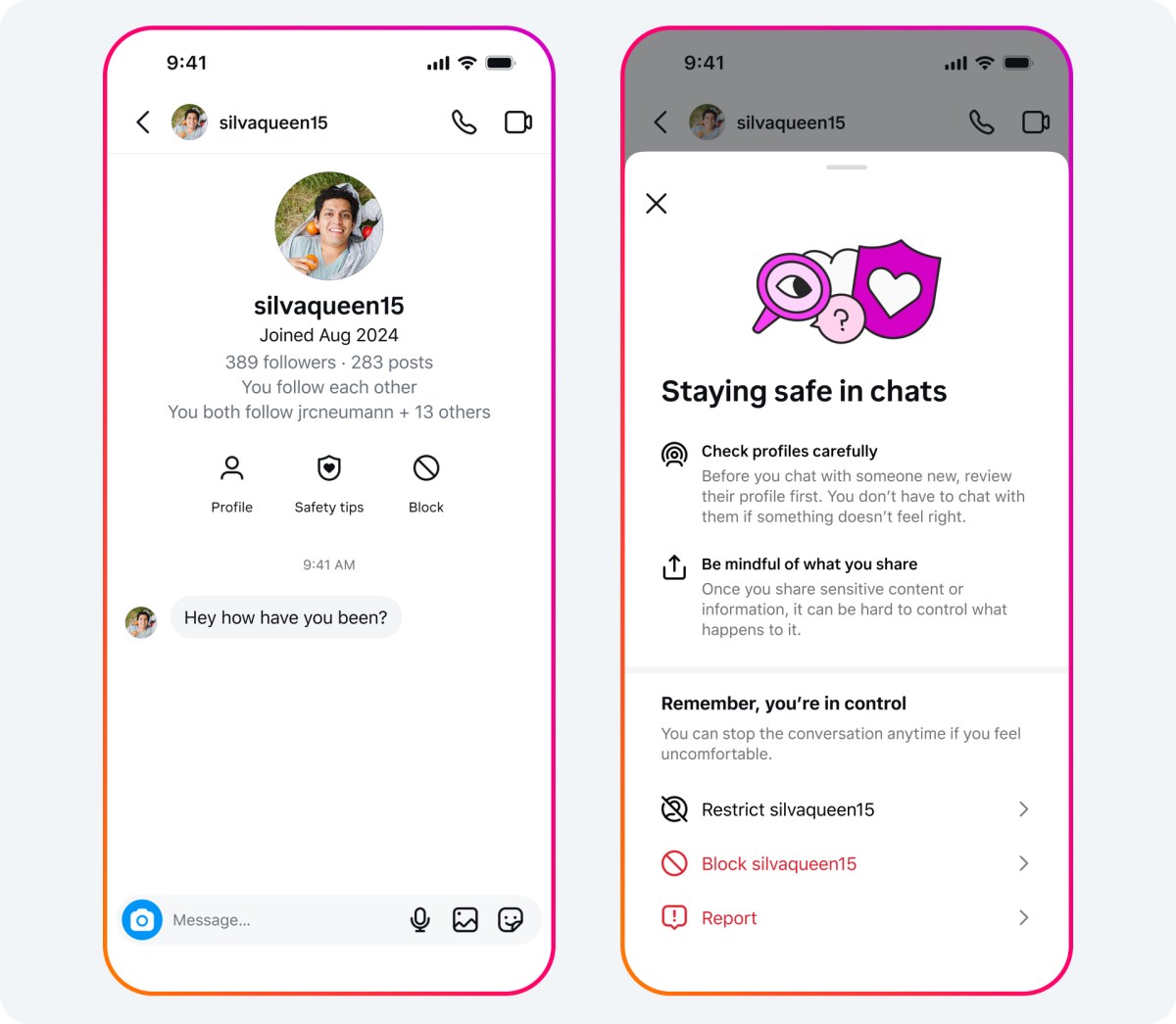
- Tap Messages at the bottom of the app.
- Open the chat with the person.
- Tap their name at the top, then tap Options.
- Tap Block, then confirm.
From your settings
- Open the menu (three lines) on your profile.
- Tap Blocked, below "Who can see your content."
- Tap Add in the top right and search for the person.
- Tap Block next to their name, then confirm.
The settings route is useful when you want to block someone you've never interacted with in the app, such as an account a friend warned you about.
What the blocked person experiences
A block changes a lot for the other person, but nothing tells them it happened. Instagram states that people aren't notified when you block them.
From their side:
- They can't find your profile, posts or story on Instagram.
- They can't mention your username or tag you.
- Messages they send you aren't delivered, now or later.
- They can't join a room you create while logged in to their account.
Your shared history changes too. Instagram says that after you block someone, their likes and comments are removed from your photos and videos, and unblocking won't restore them.
Some things stay visible to them. Instagram notes that people you block can still see your likes and comments on posts from public accounts or accounts they follow.
What changes on your side
Your chat with them stays in your inbox, but you can't message them. The thread remains so you still have the history if you need it, for example to report something.
Your follower list changes too. Instagram describes blocking as one way to make someone stop following you, so if they followed you, that follow ends with the block.
Group chats are handled separately. Instagram says that if you're in a group chat with someone you've blocked, you'll get a choice to stay or leave. If you stay, you'll both still see each other's messages in that group.
If you also have a Facebook account that isn't in the same Accounts Center, Instagram warns that the person may still be able to message or call you on Facebook unless you block them there as well.
How to unblock someone on Instagram
Blocks are reversible. To lift one:
- Open the menu on your profile and tap Blocked.
- Find the person in your blocked accounts list.
- Tap Unblock next to their name, then tap Unblock again to confirm.
You can also unblock from their profile or a chat, using the same Options menu where you blocked them.
Keep two things in mind. Unblocking doesn't bring back the likes and comments that were removed. And it doesn't restore the follow: if you want to be connected again, one of you needs to follow the other again.
How to see everyone you've blocked
Instagram keeps a full list, which is useful when you've blocked accounts over several years and can't remember who's on it. Its page on reviewing who you've blocked points to the same settings screen:
- Tap your profile picture in the bottom right.
- Tap the menu in the top right.
- Tap Blocked, below "Who can see your content."
Every blocked account appears there with an Unblock button beside it.
There's also a newer shortcut. Instagram says that if you've turned on connected experiences across your accounts in Accounts Center, you may see a "You may want to block" list at the bottom of your blocked accounts.
It's based on accounts you've blocked from messaging your Facebook account, so you can match your blocks across both apps with a tap each.
Blocking someone from commenting only
Sometimes the only problem is someone's comments. Instagram has a narrower block for exactly that, explained on its page about blocking someone from commenting.
- Open the menu on your profile.
- Tap Comments, below "How others can interact with you."
- Tap People next to "Block comments from."
- Search for the person and tap Block next to their name.
After that, they can still see your photos and videos, but any new comments from them are visible only to them.
Instagram notes that this doesn't remove their earlier comments, so delete those separately if needed.
It's a good middle step for a commenter who's rude but otherwise harmless.
Before you block: lighter options that might fit better
A block is final-feeling and easy to notice. Instagram offers several quieter tools, and one of them may solve the problem with less fallout.
Restrict screens someone's comments and messages without telling them. Instagram's page on restricting someone explains that their new comments on your posts are visible only to them unless you approve them, and their messages move to your requests.
Remove as a follower works on private accounts. Instagram's page on removing a follower says the person isn't notified and loses access to your posts.
Mute hides their posts, stories or notes from you, without changing anything for them.
Hide your story from specific people keeps your day-to-day private without affecting your profile or posts.
When a block is the right call
Lighter tools are good for friction. A block is the right answer when the problem is more serious.
Block without hesitation when someone:
- Harasses, threatens or intimidates you.
- Keeps contacting you after you've asked them to stop.
- Impersonates you or someone you know.
- Sends scams, spam or explicit content you didn't ask for.
In those cases, choose the option that also blocks accounts they may create, and consider reporting the account as well as blocking it.
A block protects you; a report tells Instagram about the behavior.
Won't blocking someone make things worse?
This is the worry that keeps people from blocking, especially when the other person is in their school, office or family.
It's a fair concern: Instagram doesn't notify them, but a profile that suddenly disappears is noticeable.
If that visibility would cause real trouble, restrict first. It gives you most of the protection in comments and messages, and nothing looks different on their side.
If you feel unsafe, though, the block is worth any awkwardness. It's built for exactly that situation, and it's easier to deal with a noticed block than with continued contact from someone who scares you.
What to know before you block someone on Instagram
Will the person know I blocked them?
Instagram doesn't notify them. They may work it out, because your profile, posts and stories no longer appear for them, and their messages don't go through.
Can someone I blocked see my comments on other posts?
Yes, in some places. Instagram says blocked people can still see your likes and comments on posts from public accounts, or from accounts they follow.
Does blocking someone also unfollow them?
It ends their follow. Instagram describes blocking as a way to make someone stop following you, and unblocking doesn't restore the follow automatically.