How to add music to an Instagram post, including carousels
To add music to an Instagram post, tap Add music on the sharing screen, pick a song, trim the clip with the slider, then share.
A photo with the right song attached feels closer to a reel than a still image, and Instagram lets you do it without any editing app.
The option sits on the last screen before you share, which is exactly why so many people miss it.
To add music to an Instagram post, tap "Add music" on the final sharing screen, choose a song, pick the snippet you want and share.Upload your photo or carousel and continue to the caption screen.Tap Add music below the location field, then browse, search or pick a saved track.Drag the audio scrubber to choose the part of the song you want, tap the checkmark and publish.
The full steps for single photos and carousels, the limits on what music you can use, and what to do if the option is missing are below.
How to add music to a single-photo Instagram post
Instagram's page on adding music to a post lists the steps for a photo:
Get to the sharing screen
- Tap Create, then tap Post.
- Take a photo or choose one from your phone's library.
- Tap Next, then tap Next again.
Choose and trim the song
- Tap Add audio (shown as Add music on some versions). Pick a song from the list or search Instagram's music library.
- Use the sliding bar at the bottom to choose which part of the song plays with your photo.
- Tap Done, then tap Share.
The song plays when people view your post, with the track name shown on the post so they can tap through to it.
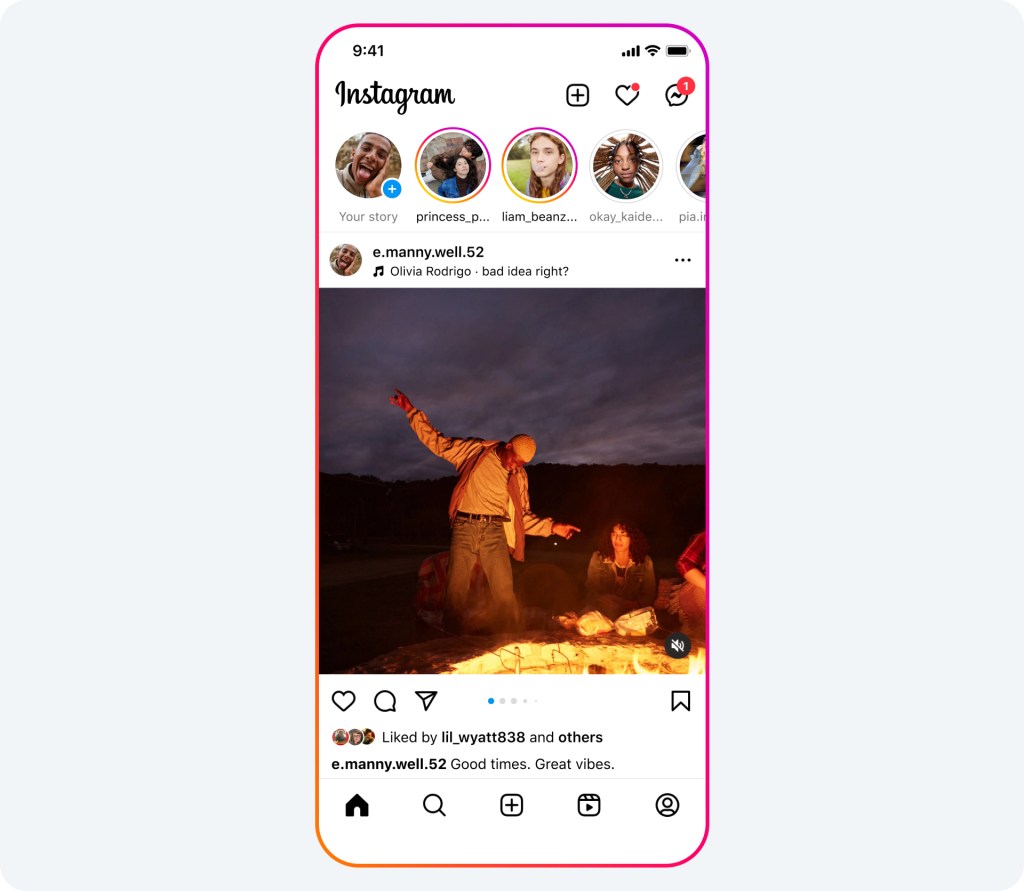
If you want to change your mind, go back from the sharing screen before posting. The music, like the crop and filter, is part of what you set before tapping Share.
How to add music to a carousel post
Carousels get music too, with one rule. Instagram's page on music for carousels says music can't be added to carousels that contain videos, so it works for photo-only carousels.
- Tap Create, or swipe right in your feed, and tap Post.
- Tap Select multiple and choose your photos, then tap Next.
- Apply filters if you like, tap Done, then tap Next.
- Tap Add music. Choose a suggested song under For you, find one in Browse, or type in the search bar.
- Edit the segment of the song you want, tap Done, finish your post and tap Share.
One song plays across the whole carousel as people swipe, so pick a track whose mood fits all the photos, not just the first.
How to choose the right part of the song
Most of the effect comes from which few seconds you pick, not which song.
The audio scrubber lets you slide through the track and hear each section before you commit.
A few habits help:
- Start on the hook. The chorus or a recognizable riff lands in the first second; a slow intro often doesn't.
- Match the energy. A calm landscape suits a slower section; a party photo suits the drop.
- Check the lyrics. A line that happens to say the wrong thing over your photo is easy to miss when you're only half listening.
Play the preview through once before sharing. It takes a few seconds and catches most mismatches.
How the song is credited on your post
You don't need to write the song name in your caption. Instagram's page on replacing audio explains that licensed audio from its library must be attributed or linked to the artist and include the name of the track, so the credit appears on the post automatically.
That credit is also a small discovery tool. Instagram's page on profile music notes that tapping a song name lets people discover more content using that song, and the same audio link on a post leads viewers to other posts and reels with the track.
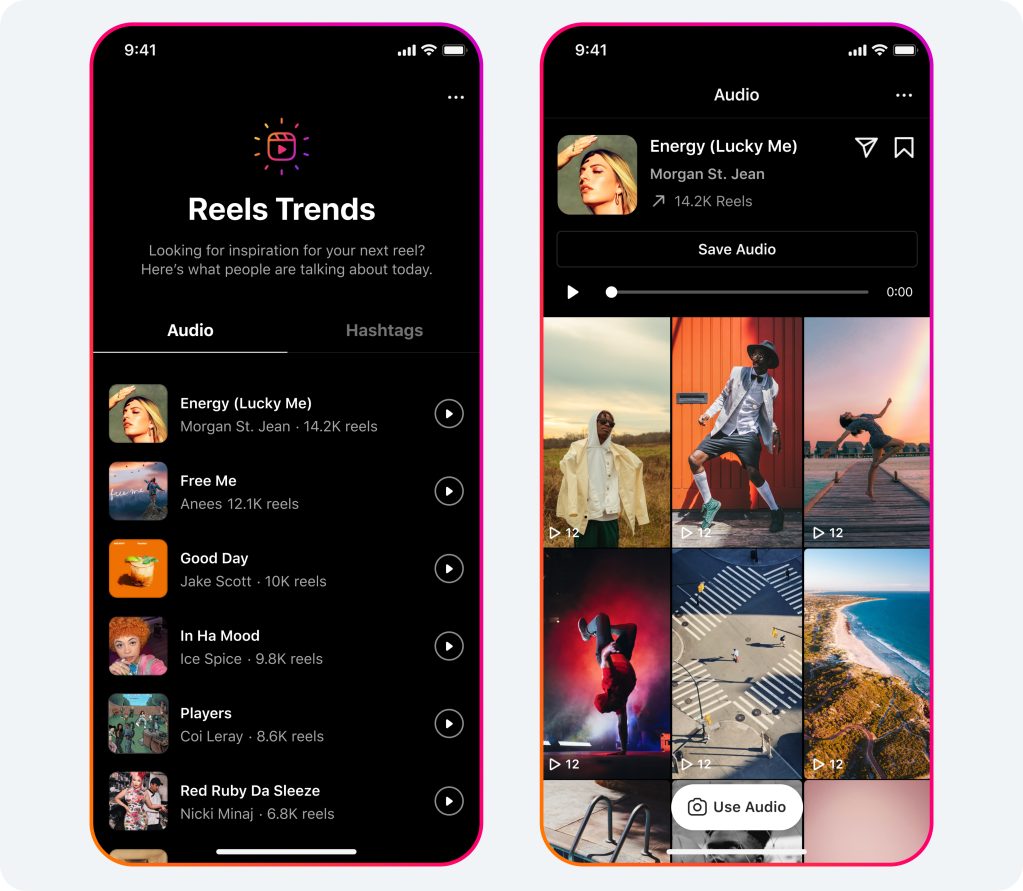
For creators, that's a quiet way to be found. Someone exploring a popular song may land on your photo among the others using it, which is one more reason to choose a track that genuinely fits the picture.
Why some songs aren't available
Instagram's music library isn't the whole of recorded music.
It's built on licensing agreements with rights holders, and Instagram's page on using music in videos explains that those agreements protect artists and songwriters and set limits on how recorded music can be used.
That has a few practical effects:
- A song you want may not be in the library at all.
- Availability can differ by country.
- A song that was available when you posted can later become unavailable.
When that last one happens, Instagram may mute the audio on your post. The post stays up and can still be viewed; only the song goes quiet.
What to do if your post's music gets muted
Instagram has a fix for muted posts. Its page on replacing muted audio explains the steps:
- Open the post with the muted audio.
- Tap Audio unavailable.
- Tap Replace audio, then Replace audio again.
- Choose the part of the new track you want, and tap Done.
Instagram says you can replace a muted track only once, using another licensed track from the Instagram audio library.
It also notes you may see a notification suggesting a replacement when you view the post.
Instagram explains why muting happens: changes to its agreements with music rights holders can result in audio being muted.
Your original audio can be reused
If you add your own audio rather than a library track, there's a detail worth knowing. Instagram's page on adding music to a post says that if your account is public, anyone can reuse your original audio in their post.
For most people that's a plus: a sound you created can spread as others use it.
If you'd rather keep it to yourself, Instagram's suggestion is to make your account private.
When the Add music option is missing
If you can't find the option, work through these:
- Update the app. Music features change often, and older versions may not show them.
- Check your post type. A carousel that includes a video can't take music.
- Check your account type and region. Music availability depends on licensing, which varies by country and can differ for some business accounts.
- Try a different song. The track you searched for may simply not be licensed where you are.
The same problem often shows up in stories, where the music sticker is missing or greyed out. This troubleshooting walkthrough for when you can't add music to an Instagram story covers the story-side fixes.
Music in stories and reels works differently
Posts aren't the only place to add a song. In stories, Instagram's story editing help explains that you tap Music, select a song or search for one, and, where lyrics are available, choose a font and design for them and pick the part of the song that plays.
Instagram's music guidelines also say there are no limits on using music in stories, while longer recorded tracks in videos and live broadcasts are more likely to be limited. Shorter clips of music are recommended.
So for a longer listen, a story often gives you more freedom than a video. For a photo on your grid, the post music option is the right tool.
Add a song to your profile too
Instagram also lets you pin a song to your profile. Its page on adding music to your profile explains the steps: tap Edit profile, tap Music below Add to profile, search for a song or browse For you, tap the track and tap Done.
You can choose 30 seconds of the song, and it stays on your profile until you remove it.
Visitors can tap play to hear it, or tap the song name to find reels using it.
It's a small touch that tells new visitors something about you before they scroll.
Adding music to Instagram posts, in summary
For a photo, go to the final screen, tap Add audio or Add music, pick a song, choose the section with the slider and share. For a carousel, it works the same way, as long as it has no videos.
If music gets muted later, replace it once from the post. And if the option is missing, update the app, check your post type, and try another track.
Music on Instagram posts: what to know
Can I add music to a post after it's published?
Instagram's help pages describe adding music before you share, and replacing it only when a track has been muted. Plan the song as part of the post.
Why can't I add music to my carousel?
Instagram says music can't be added to carousels that contain videos. Remove the videos or post them separately, and the music option works for the photos.
Can other people use the music from my post?
Library songs are available to everyone in Instagram's music library. Original audio you create can be reused by others if your account is public.