
Edit Google Business listing details: what saves, what waits, what gets refused
To edit Google Business listing details, select Edit profile on Search or Maps, change the field and save. Most show in 10 minutes.


Who actually decides what your business listing says about you?
The answer is less flattering than most owners expect, and it changes how you should think about every field on the edit screen.
How do I edit my Google Business listing?
Sign in to the Google Account that manages the profile, open the profile on Google Search or in the Google Maps app, select Edit profile, change the field you need, and select Save. Google reviews the change before it publishes, so plan on roughly 10 minutes for ordinary edits and longer for the ones that affect where you appear.
Below: the routine itself, the fields strangers are allowed to change, and the reasons an update never shows up.
Your listing has two sets of editors, and only one of them is you
Owners tend to picture a business listing as a document they control. It behaves more like a shared record that Google maintains, with the owner as its most trusted contributor rather than its only one.
Google documents a public path for this. Anyone signed in to a Google Account can open a place in Maps and select Suggest an edit. Google's help pages on how to edit business information in Google Maps say that route covers the name, the category, and attributes such as hours, phone number, website and address.
Suggested edits to attributes are limited to mobile devices, and adding a photo helps verify the suggestion.
None of that removes your control. Owner edits carry far more weight than a stranger's suggestion, and the suggestion is a signal for Google to weigh rather than an instruction it follows.
But it explains something that looks inexplicable from the inside: a field you never touched can change.
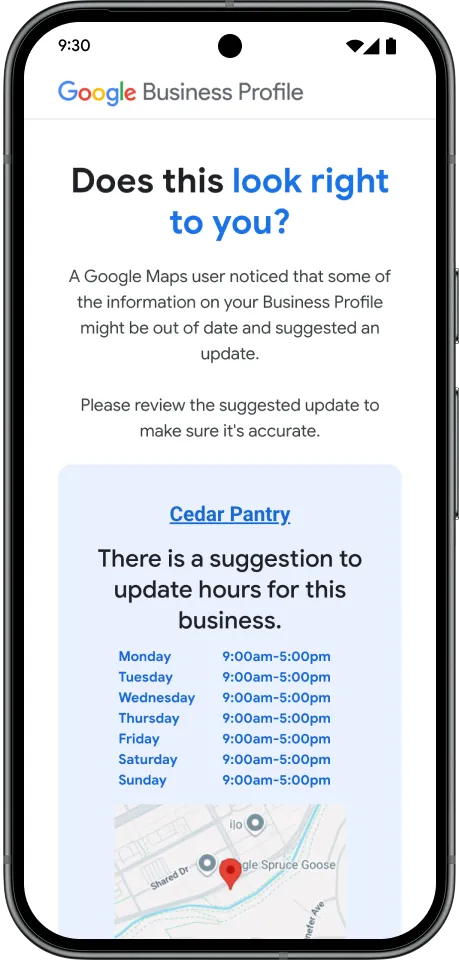
The practical consequence is that editing a Google Business listing is maintenance, not setup. If you have never claimed the profile at all, that step comes first. This rundown of how to add a business location to Google Search covers the version of the task that starts from nothing.
How do I edit my Google Business listing on a phone or a desktop?
Both routes edit the same record, and neither needs a separate dashboard.
On a desktop, sign in to the account that manages the profile and search for your own business name on Google. Your profile appears with owner controls attached. Select Edit profile, open the section carrying the field you want, change it, and select Save.
On a phone, open the Google Maps app while signed in to the same account, tap Business at the bottom right, then tap Edit profile. Change the field and tap Save.
The two are not identical in what they expose. Google states that certain features to manage a profile may differ between Search and Maps and between device operating systems, which is why a setting that seems to have vanished on mobile is usually sitting untouched on a desktop browser.
When something is missing, change the screen before you conclude the feature was removed.
One habit is worth building here. Read the whole section you opened rather than the one field you came for. The form groups related information together, and stale entries cluster: old hours next to an old phone number, an old description next to an old service area.
Which fields change quietly and which ones start a review
Not every field on a Google Business listing carries the same weight, and treating them as equal is why so many owners think the system is broken.
Google's documentation on how to edit your Business Profile sets the boundaries of what the form holds. Inside it, the fields sort into two rough groups.
The low-friction group:
- Business description, up to 750 characters.
- Photos, videos and attributes.
- Opening hours, including special hours for holidays.
- Website link and social media links.
- Products and services, where your category supports them.
The heavier group is short and predictable: the business name, the street address, the map pin, the service area, and the primary category. These are the fields that decide whether and where you appear against a search, so they draw the closest examination.
Google's address documentation is the clearest statement of the timing anyone gets. It says changes to your profile usually take about 10 minutes to show up, and that in some cases it can take up to 30 days. It also points edits that are held back to Google's pending-review process, which is where the gap between saving and seeing usually sits.
The same page walks through how to manage your business address if the pin itself is the problem.
Description fields reward a second pass rather than a first draft, since they are read by people deciding whether to call you. Owners who struggle with the blank box tend to start from a draft and cut it down.
Why an edit gets refused, and what to do about it
A rejected edit rarely arrives with an explanation, so read the refusal as a signal about the field rather than about you.
Three causes account for most of them.
The first is a name that is not the business name. Google expects the name on a listing to match the name customers see in the real world, and it expects businesses showing an address to keep permanent fixed signage with that name at that address. Appending a city, a service or a keyword string is the edit most likely to bounce.
The second is an address that does not describe a place customers can visit. Virtual offices, mailboxes and addresses shared with other businesses all raise questions that a quick review cannot settle in your favour.
The third is repetition. Submitting the same change three times while the first submission is still pending does not accelerate anything, and a pattern of rapid re-edits on sensitive fields looks like exactly what Google's review is built to catch. Change it once, then wait a day before deciding it failed.
When a heavier edit genuinely will not stick, the fix usually sits outside Google. Make the name, address and phone number on your website and in the directories that list you agree with what you are trying to publish, then edit again. Google weighs outside signals, and an edit that contradicts every other source on the internet is asking to be overruled.
What happens after the edit saves
A saved edit is not a finished job, and the last ten per cent is the part almost everyone skips.
Open your listing the way a customer would, signed out or in a private window, on both a phone and a desktop. Read the field you changed.
If you edited hours, look ahead to the next public holiday while you are there, because wrong holiday hours are the most visible error a local listing can carry and the one that generates actual complaints.
Then check the fields you did not touch. The point of the two-editor arrangement is that the rest of the record moves without you, so the review you run after an edit is the only time most owners look at the whole profile at once.
Knowing whether the profile is doing its job is a separate question from whether it is accurate. Owners answer it by tracking their position for the searches that bring customers. That position is the number an edit is meant to move.
The order to work in when several fields are wrong
Most owners open a Google Business listing because one thing is wrong, then discover four. Doing them in the wrong order turns a ten-minute job into three weeks of uncertainty.
Start with the heavy fields, one at a time.
If the address is wrong, fix the address and stop. It is the change most likely to sit in review, and it is the one you want dated earliest so the clock starts running while you deal with everything else.
Then do the light fields in a single pass: hours, description, photos, links, services. These usually publish quickly, so batching them costs nothing and gives you a visible result while the heavy edit waits.
Leave the category change for last, and make it deliberately. The primary category shapes which searches you compete in, so switching it to something broader in the hope of appearing more often tends to cost you the searches you were already winning.
Then write down what you changed and when. Nobody does this, and it is the only reason anyone can tell the difference between an edit still in review and an edit that was quietly overruled a week later.
Questions owners ask before they change a field
Can anyone edit my Google Business listing?
Anyone signed in to a Google Account can suggest an edit to a business in Maps, but only owners and managers can change the profile directly. Suggestions are weighed by Google rather than applied on request, and owner edits carry more weight than public ones.
How long does it take for an edit to appear?
Google documents about 10 minutes as the usual wait, and up to 30 days in some cases. Descriptions, photos and hours tend to land at the fast end. Name, address, pin and category changes sit at the slow end because they are reviewed hardest.
Why does my listing keep reverting to old information?
Google builds business information from several sources, not only from your entries. When your website, your other listings and your profile disagree, the profile can settle on the version the outside world supports. Correcting the outside sources is what makes the edit stay.
Do I need to edit on Search and on Maps separately?
No. Both write to the same underlying profile, so an edit saved on one appears on the other once it clears review. The only reason to switch is that certain controls are available on one screen and not the other.
What a stale listing quietly costs you
An out-of-date listing does not announce itself. Nobody calls to say the hours were wrong, and the customer who drove to the address you moved out of two years ago does not come back to explain.
That is the real argument for treating the edit screen as a recurring appointment rather than a one-off repair. The fields that decay fastest are the ones customers act on: hours, phone numbers, the pin, and the services you no longer offer.
A profile that has been complete and consistent for months also gives Google's review less to question when a heavier change finally needs approving. It is a quiet advantage, and it only shows up on the day you need it.
Edit the listing today because it is wrong. Then put a date in the calendar to read it again before it goes wrong on its own.