
Claim business on Google when someone else already owns it
To claim business on Google, open the listing in Maps, select Claim this business, then Manage now and verify ownership.


Most walkthroughs treat this as a two-click job. For a large share of owners, the button those walkthroughs point at is not on the screen at all, because the listing was claimed years ago by an account nobody remembers.
To claim business on Google, work from the existing listing rather than from a fresh signup form.Search the business name with its city in Google Maps or Google Search.Select "Claim this business", then "Manage now".Pick a verification option and follow the on-screen instructions.
When the profile is already verified by another account, that claim link is replaced by an access request the current owner has 3 days to answer, and the walkthrough below covers both routes.
Why the claim link is missing for so many owners
A Business Profile does not wait for you to create it.
Google assembles listings from information it already holds about a location, which is why a shop can appear in Maps with hours, photos and reviews before the owner has opened a single account.
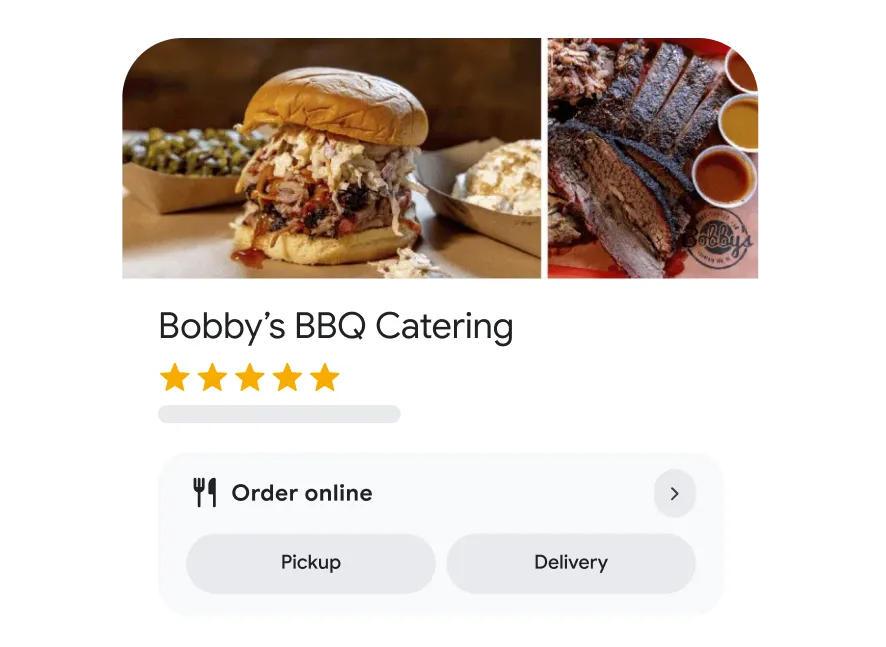
That means the instruction to claim business on Google rarely starts where people expect. The question is almost never "how do I create this". It is "which state is this listing in". There are three, and they behave differently:
- Unclaimed: no account is attached, and the claim link appears on the profile.
- Claimed but unverified: someone started the process and never finished it.
- Verified by another account: no claim link appears, and access is requested instead.
Working out which one you are looking at takes ten seconds and saves a week. Search the business name, open the profile, and look for the claim option.
Its absence is the diagnosis.
The mistake this prevents is the expensive one.
An owner who cannot find the claim link often creates a brand new profile instead, and now the business has two listings competing for the same customers, each holding half the reviews.
The claim path Google documents
When the claim link is there, the sequence to claim business on Google is short, and it is the same on desktop and mobile.
Find the right listing first
- Open Google Maps on a computer, or the Google Maps app on your phone.
- Search the business name together with its city.
- Select the correct result, checking the street address rather than the name.
- On the app, tap "About" inside the profile to reach the claim option.
Claim it and start verification
- Select "Claim this business", then "Manage now".
- Choose "I own or manage another business" if Google presents that option.
- Select a verification option from the ones offered.
- Follow the on-screen instructions to finish.
Google's page on adding or claiming a Business Profile documents this path for both devices and confirms that claiming costs nothing.
It also asks you to check that the business address is correct and meets its guidelines before you begin, which is not filler advice.
Address mismatches are the most common reason a verification attempt fails later.
The request-access route when the profile is taken
A verified profile owned by someone else follows a different procedure, and it is the one worth understanding properly because it involves waiting.
Start at business.google.com/add and search for the business. When Google indicates the profile may already be managed by someone else, select "Request Access" and complete the details it asks for.
The current owner is notified by email and has 3 days to respond. Google's documentation on requesting ownership of a Business Profile sets out what each outcome means:
- Approved: an approval email arrives and the profile becomes yours to manage.
- Denied: a rejection email arrives, and you can suggest an edit or appeal.
- Silence: after 3 days you may get the option to claim the profile yourself.
Read that third line carefully, because a lot of advice rounds it up into a promise. Google states that the option to claim a profile after no response is not always available.
Waiting out the window is a real path, not a guaranteed one, and planning as though it were guaranteed is how businesses lose a month.
The faster route, when it exists, is human. Old agency accounts, former marketing staff and the contractor who built the website are behind most of these blocked listings, and a direct message usually moves quicker than a request queue does.
Which route your situation calls for
The three listing states each point to a different first move, and matching them correctly is most of the work.
If no profile exists for the location at all, start from business.google.com/add and create one. This is the rarest case, and it is the only one where building from a blank form is correct.
If a profile exists and shows a claim option, take it immediately. An unclaimed listing is editable by the public and defended by nobody, so the gap between finding it and claiming it is the riskiest period the listing will have.
If a profile exists with no claim option, the account attached to it is verified. Send the access request, note the date, and use the 3-day window to track down whoever set the listing up in the first place. Those two efforts run in parallel rather than in sequence.
If two profiles exist for the same location, claim the one customers are already finding, judged by reviews and photos rather than by which looks tidier, then request the merge afterward.
The reason to settle this before touching anything is that the routes are hard to reverse. A duplicate created in the wrong state takes longer to unwind than the original claim would have taken to complete, and it splits the reviews you were trying to protect.
Verification is where claims pass or fail
Claiming is the paperwork. Verification is the part that decides whether the claim holds.
Google may offer a phone call or text carrying a code, an email, a live video call showing the location, or a postcard mailed to the address. Which options appear depends on the business and its category, and you generally do not get to choose freely.
Google says verification reviews take up to 5 business days, with some profiles verified instantly. Build your plans around the longer figure. If a launch date depends on the listing being live, start the claim well before you need it.
One detail people miss: verification is checking consistency, not just identity.
The name, address and phone number you enter are compared against what Google already associates with the location, so a business trading under one name and registered under another should settle which version the listing uses before verifying, not after.
Who is actually eligible to claim a listing
Google limits adding and claiming to businesses that meet its ownership guidelines, and regulated professions are where this gets genuinely confusing.
Agents, brokers and practitioners who work under a larger brand often cannot tell whether the listing belongs to them or to the company above them.
The test is control rather than employment. A person who operates a location, sets its hours and serves customers from it is in a different position from a representative who works within someone else's premises.
Getting eligibility wrong is not a small setback. A claim that does not fit the guidelines fails verification repeatedly without ever explaining why, and resubmitting the same details does not change the result.
A verified listing can still be invisible
Here is the outcome nobody warns new owners about. The claim clears, the profile says verified, and customers still cannot find the business when they search for it.
Verification confirms who controls the listing. It does not guarantee where that listing appears, and the two get conflated constantly.
A thin profile with a missing category, no hours and no photos can be fully verified and still lose to a competitor two streets away.
Duplicates cause the same symptom for a different reason. Google's guidance on duplicate profiles and ownership issues explains that a merge is requested by reporting a suggestion on Google Maps.
It also notes that reviews are combined in a merge, while replies to those reviews may be lost.
Verified and still not turning up? This rundown of why a Google Business Profile is not publicly visible covers the usual causes in order of likelihood.
Handing the listing to a team without losing it again
The last step of a claim is deciding who holds it, and this is the decision that creates the next generation of blocked listings.
Claim on an account the business controls rather than on a personal inbox. Then add colleagues as managers instead of sharing one password, so people can edit details and reply to reviews while ownership stays in one accountable place.
Multiple locations and multiple staff make this harder, not easier.
Agencies deserve the same treatment. Add them with manager access, never by handing over the owning account, so the end of a contract is a permissions change rather than a recovery project.
Ownership questions that come up mid-claim
Does it cost anything to claim a listing on Google?
No. Google's own documentation states that claiming a Business Profile is free. Anyone charging you purely for the act of claiming is charging for the paperwork around it, not for access to Google.
Should I create a new profile instead of claiming the existing one?
No, and this is the single most damaging shortcut in the process. A second profile for the same location splits reviews and confuses customers, and removing a duplicate afterward is slower than claiming the original would have been.
What if my access request gets no reply at all?
After the 3-day window, Google may offer you the option to claim the profile, but its documentation is explicit that this option is not always available. If it does not appear, suggesting an edit and appealing are the routes that remain open.
Can I fix wrong information while I wait?
Partly. Anyone can suggest an edit to business information in Google Maps, so an incorrect phone number or set of hours can be reported before you have control. Edits submitted this way are reviewed rather than applied on request.
If you are hesitating because someone else is on the listing
The most common reason a business never gets around to this is the assumption that a claimed listing is a closed door.
It is not. The access request exists precisely for this situation, it runs on a documented 3-day clock, and a denial still leaves the edit and appeal routes open.
The hesitation usually hides a second worry: that starting the process will somehow break the listing that customers are already finding. Requesting access does not remove the profile, hide it, or reset its reviews.
The worst realistic outcome is a rejection email and the same listing you had before.
Set aside twenty minutes to claim business on Google properly. Search the business, read which of the three states the listing is in, and take the path that matches. Whether you finish today or wait out a response window, the useful version of this task starts with knowing which door you are standing at.