What your LinkedIn address is and where to find it
Can't find your LinkedIn address? It's your public profile URL, under Public profile & URL on desktop or in Contact info in the app.

When a form asks for your "LinkedIn address," it isn't asking for an email or a street address.
It wants one web link.
Where do I find my LinkedIn address?
Your LinkedIn address is your public profile URL, the link that starts with www.linkedin.com/in. On a computer, click Me, then View Profile, and it's shown under Public profile & URL on the right; in the LinkedIn app, it's in your Contact info, under Your Profile.
Below: how it differs from your account email, when it's visible to others, and how to change it to something cleaner.
Your LinkedIn address is your public profile URL
LinkedIn doesn't use the phrase "LinkedIn address" itself. Its help pages call it your public profile URL.
It's the link people use to open your profile from outside LinkedIn. Job applications, resumes, email signatures and conference badges all ask for it under different names: LinkedIn URL, LinkedIn link, profile link, LinkedIn address.
LinkedIn's page on finding your public profile URL says it starts with www.linkedin.com/in, followed by the part that's unique to you.
Your LinkedIn address isn't your LinkedIn email
The most common mix-up is between your profile address and the email address on your account. They do very different jobs.
Your profile address is public-facing. It opens your profile for anyone you share it with.
Your account email is private. It's how you sign in, where LinkedIn sends notifications, and what LinkedIn uses for your account. LinkedIn also says a primary email address is mandatory to send invitations.
If a form has separate fields for "email" and "LinkedIn," the LinkedIn field wants the profile link. Your account email goes nowhere near it.
Where your LinkedIn email address lives instead
If the form really did want your account email, that sits somewhere else entirely.
Click Me, then Settings & Privacy, then Sign in & security, and open Email addresses under Account access. That page lists every email on your account and shows which one is primary.
LinkedIn lets you sign in with your primary address or any additional one you've verified. It also recommends keeping at least one personal and one work address on the account.
That advice matters more than it sounds. A personal address keeps you in control of the account if you leave the job your work email belongs to.
Where to find your LinkedIn address on a computer
- Click the Me icon at the top of your LinkedIn homepage.
- Click View Profile.
- Look for Public profile & URL in the right pane. Your address is shown there.
That panel is also the control room for the address. You change it and manage your public profile from the same spot.
Where to find your LinkedIn address in the app
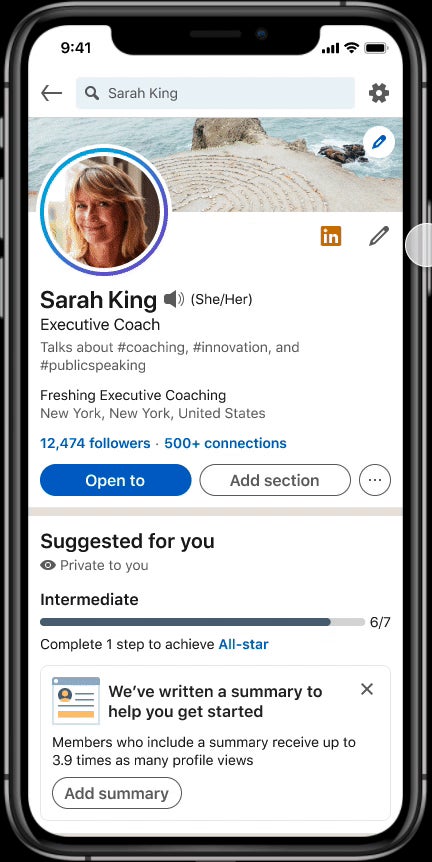
On the app, the address sits inside your contact details:
- Tap your profile photo, then tap it again to open your profile.
- Tap the More icon next to the Add section button.
- Tap Contact info.
- Read the address under Your Profile.
In a mobile browser, the route is shorter. Tap your profile photo, scroll to the Contact section, and the address is listed under LinkedIn.
Public profile & URL versus Contact info
The same address shows up in two places, and each one has its own purpose.
Public profile & URL, on the desktop profile page, is where you manage things. It's the entry point for changing the address and for choosing what outsiders can see of your profile.
Contact info, in the app, is where the address is listed alongside your other contact details. It also has an edit route of its own, which leads back to the same public profile settings.
So if you're copying the address, either place works. If you're changing it, both roads end at the same settings page.
Is your LinkedIn address public?
Only if your public profile is. LinkedIn says you won't have a public profile URL at all if you don't have a public profile.
That's the setting to check when your address seems to be missing. LinkedIn's page on controlling your public profile explains that turning off your profile's public visibility hides your public profile from people who aren't LinkedIn members and from search tools.
Signed-in members can still open your profile either way. The public visibility setting decides what outsiders see when they follow the link.
If you're sharing your address with recruiters who may not be signed in, keep your public profile on. Otherwise there may be no public address to share at all.
Why search engines may show an older version of your profile
Your address is also what search engines index. That's why changes to your public profile don't always show up in search results straight away.
LinkedIn warns that search engines may take several weeks or even months to reflect changes to your public profile, and LinkedIn doesn't control that timing.
So if you've just changed your address or hidden parts of your public profile, don't be alarmed when an older snippet still appears in search. It catches up on the search engine's schedule, not LinkedIn's.
Why some LinkedIn addresses start with a country code
Not every address begins with www. LinkedIn notes that some countries get a two-letter prefix, such as ca.linkedin.com/in/.
The prefix follows the country on your profile. If you change your country, LinkedIn changes the prefix automatically.
Old links don't break when that happens. LinkedIn says URLs with the previous prefix still work, so an address you printed months ago keeps reaching you.
How to change your LinkedIn address on a computer
A default address can be long and awkward. LinkedIn's page on managing your public profile URL lets you replace the last part with something cleaner.
- Click the Edit icon next to Public profile & URL on your profile.
- Find Edit your custom URL and click the Edit icon there.
- Type the last part of your new address.
- Click Save.
Only the part after /in/ changes. The start of the address stays the same.
How to change your LinkedIn address in the app
On mobile, the change starts from your contact details:
- Open Contact info from your profile.
- Tap the Edit icon.
- Tap Profile URL to open the Public profile settings page.
- Edit your custom URL there and save it.
The new address applies everywhere at once. You don't have to update it separately on desktop.
LinkedIn's rules for a custom address
LinkedIn sets a few limits on what the custom part can be:
- Between 3 and 100 characters.
- No spaces, symbols or the word "LinkedIn."
- Not case sensitive, so capital letters don't create a different address.
- First come, first served, so a common name may already be taken.
If your plain name is gone, a middle initial or your field of work usually solves it.
How many times can you change your LinkedIn address?
LinkedIn allows up to five changes within six months. That's plenty for fixing a typo, but not a reason to experiment.
There's a useful safety net. LinkedIn says an old address stays linked to you for six months, unless you unlink it. Anyone following your previous link in that time still reaches your profile.
Use those six months to update the places your old address appears: your resume, email signature, website and any printed cards.
When to keep the address you already have
Changing your LinkedIn address isn't always worth it.
If your current address is already on business cards, a published book, printed brochures or years of email signatures, a cleaner link has a real cost. The six-month grace period covers most digital places, but it won't reprint anything.
A good rule: change it early, once, and then leave it alone.
A plain, stable address beats a clever one you'll want to change again next year.
Putting your LinkedIn address on a resume or card
Where you write the address shapes how people use it.
On a digital resume or email signature, make it a clickable link, so nobody has to retype it.
On paper, the address has to be typed by hand. That's where a short custom address earns its keep: it's quicker to read and harder to mistype.
Whichever version you use, test it before you send anything out. Paste it into a browser window where you're signed out, and check it opens the profile you expect.
You don't have to customize it
The default address works. It opens your profile, it's unique to you, and nobody will reject an application because of a few extra characters in a link.
Customizing is an option, not a requirement. Do it if you'll be writing the address by hand or printing it, and skip it if you'll always share it as a clickable link.
Either way, you now know where it lives. Copy it from Public profile & URL or Contact info, and paste it into the form that's been asking for it.
Profile address questions
Is my LinkedIn address case sensitive?
No. LinkedIn says custom URLs aren't case sensitive, so capital letters don't change where the link goes.
Can I have more than one LinkedIn address?
No. You can hold one custom URL at a time. An old one stays linked to you for six months after a change, unless you unlink it.
What if someone already has the address I want?
Custom URLs are first come, first served. Add a middle initial, a profession or a short suffix to make yours unique.