Google Search Console Historical Data: How Far Back It Really Goes and How to Keep More of It
Google Search Console only keeps 16 months of Search data. Here is how to view historical trends properly and preserve more of it before it rolls off.


The Moment You Realize the Data Isn't There
It usually happens during a quarterly review. Someone on the team wants to show how organic traffic has changed since a redesign, or a client asks for a two-year comparison to justify a renewed SEO contract. You open Google Search Console, set the date range as far back as it will go, and hit a wall. The data simply stops. Not "loading slowly," not "hidden behind a filter." Gone.
This catches even experienced marketers off guard because Google Analytics trained everyone to expect that historical data just sits there indefinitely, waiting to be queried. Search Console doesn't work that way. It was never built as a long-term archive, and the gap between what people assume it stores and what it actually stores causes real problems: lost year-over-year comparisons, unprovable ROI claims, and seasonal patterns that can't be demonstrated because the proof window closed months ago.
📢 Check the Reddit discussion: ROI Without Conversion Tracking? It’s Like Driving Blindfolded!
What's Actually Going On: The 16-Month Window
Google Search Console's Performance report retains roughly 16 months of Search data. That's the honest number, not a rounded-down estimate. Once a date falls outside that rolling window, it is no longer retrievable through the Performance report UI, and it will not show up through the standard Search Analytics API either. There's no toggle, no "request older data" button, and no support ticket that gets it back. When it ages out, it's out.
Sixteen months is a deliberate design choice, not a bug. It's just long enough to let you compare this January to last January (a full year-over-year view) with a few extra months of buffer on either side. It's also short enough that Google isn't obligated to store and serve years of granular, query-level data for every property on earth. For Google, that's a reasonable engineering and cost tradeoff. For a site owner trying to build a three- or five-year performance narrative, it's a real constraint.
The practical consequence is simple: if you don't take data out of Search Console before it rolls off the back end of that 16-month window, it's lost permanently. Nothing recovers it once it's gone.
The Walkthrough: Seeing What You Have, and Saving What You'll Need Later
Step 1: Pull up the full available window
In the Performance report, click the date filter and select "Last 16 months." This is the maximum native range GSC will show you. Google added this option specifically because the default views (7 days, 28 days, 3 months) undersell how much history is actually sitting there. If your property hasn't been verified for 16 months yet, you'll only see data back to the verification date, which matters more than people think (more on that in the migrations section below).
Step 2: Use "Compare" instead of just eyeballing a longer line
Under the same date picker, there's a "Compare" tab that lets you set two ranges side by side, for example, the last 3 months versus the same 3 months a year earlier. This is more useful than just widening the trend line, because GSC will overlay the two periods on the same chart and give you percentage change figures per query, page, country, and device. For seasonal businesses or content that spikes around specific events, this comparison view is where the actual proof lives, not the single unbroken line.
Step 3: Read the trend line for multi-month decay, not just spikes
A 28-day view makes sudden drops obvious (a manual action, a botched migration, an algorithm update) but it hides slow bleed. A page that loses 3-4% of its clicks every month for eight months looks flat week to week and catastrophic year to year. Set the range to the full 16 months and look for a downward slope rather than a jagged line. This is one of the more underused features of the Performance report because most people default to short windows out of habit.
Step 4: Start a manual export routine now
The most basic form of preservation is exporting the Performance report to CSV or Google Sheets directly from GSC. Every table view in the Performance report has an export icon. Set a recurring calendar reminder (monthly is reasonable) to export queries, pages, and the top-level performance summary. Store these in a dated folder or a single growing spreadsheet with a "month" column. It's manual, it's a little tedious, and it works.
Step 5: Automate it with Search Analytics for Sheets
For teams that don't want to remember a monthly export, the "Search Analytics for Sheets" add-on (a free Google Sheets add-on built specifically for this use case) can be scheduled to pull Search Console data into a spreadsheet on a recurring basis, appending new rows rather than overwriting old ones. This effectively turns a spreadsheet into a rolling archive that never loses data to the 16-month cutoff, because it's capturing snapshots before they age out. It uses the same Search Analytics API GSC itself relies on, so the data matches what you'd see in the UI.
Step 6: Set up the BigQuery bulk data export for real completeness
For sites that need ungated, complete historical logging (agencies managing many properties, enterprise SEO teams, anyone who has been burned by losing data before), Google Search Console offers a native bulk data export to BigQuery. This is configured under Search Console's Settings, not through a third-party tool. Once connected, GSC streams daily Search performance data directly into a BigQuery dataset in your Google Cloud project.
This method matters for two reasons beyond just avoiding the 16-month cliff. First, it captures data at a level of granularity the standard UI doesn't show, since the Performance report samples and aggregates some low-volume, long-tail queries for privacy and performance reasons, while the bulk export captures the full underlying dataset. Second, because it's a daily append into your own infrastructure, there's no rolling window at all. Data from three years ago stays exactly where you put it.
BigQuery is overkill for a small blog checking traffic once a quarter. It's the right call for anyone who needs query-level precision over multi-year periods, or who has to defend historical SEO performance numbers to stakeholders who will ask follow-up questions.
Practical Tips and Edge Cases
Property type fragmentation is real. If a site has ever existed as separate URL-prefix properties (http://example.com, https://example.com, https://www.example.com) instead of a consolidated Domain property, each of those old properties may hold its own slice of history from before consolidation. Add the Domain property early, but don't delete or ignore the older URL-prefix properties. They may still be the only place certain historical data lives.
Domain and protocol migrations split history too. Moving from http to https, changing subdomains, or switching the primary domain all create a new property from GSC's point of view, even though it's "the same site" to your team. The old property keeps its own 16-month clock and doesn't hand its history over to the new one. If a migration is coming, start exporting or setting up the BigQuery link on the old property well before the cutover, not after.
Verification history caps what you can see, regardless of the 16-month rule. A property newly verified 3 months ago will only show 3 months of data even though it's technically within the 16-month window, because GSC can't show data from before it had permission to track the property. This is a common source of confusion when someone assumes "16 months" is guaranteed and it isn't, if verification happened later.
Know when BigQuery is more than you need. If the goal is a once-a-year board slide showing traffic is up, a monthly CSV export or the Sheets add-on is enough. If the goal is defending SEO spend line by line, tracking decay across hundreds of pages, or feeding data into a separate BI dashboard, the BigQuery export is worth the half-hour setup.
Your History Now Has More Than One Chapter
Search Console just got more complicated in a way that changes what "historical data" even means for a brand. In July 2026, Google introduced platform properties in Search Console: when setting up a new property, site owners can now choose Instagram, TikTok, X, or YouTube as the property type, in addition to the standard website property. These new property types let you see how content on those platforms performs specifically in Google Search and Discover results, using the same reporting interface already used for website performance.
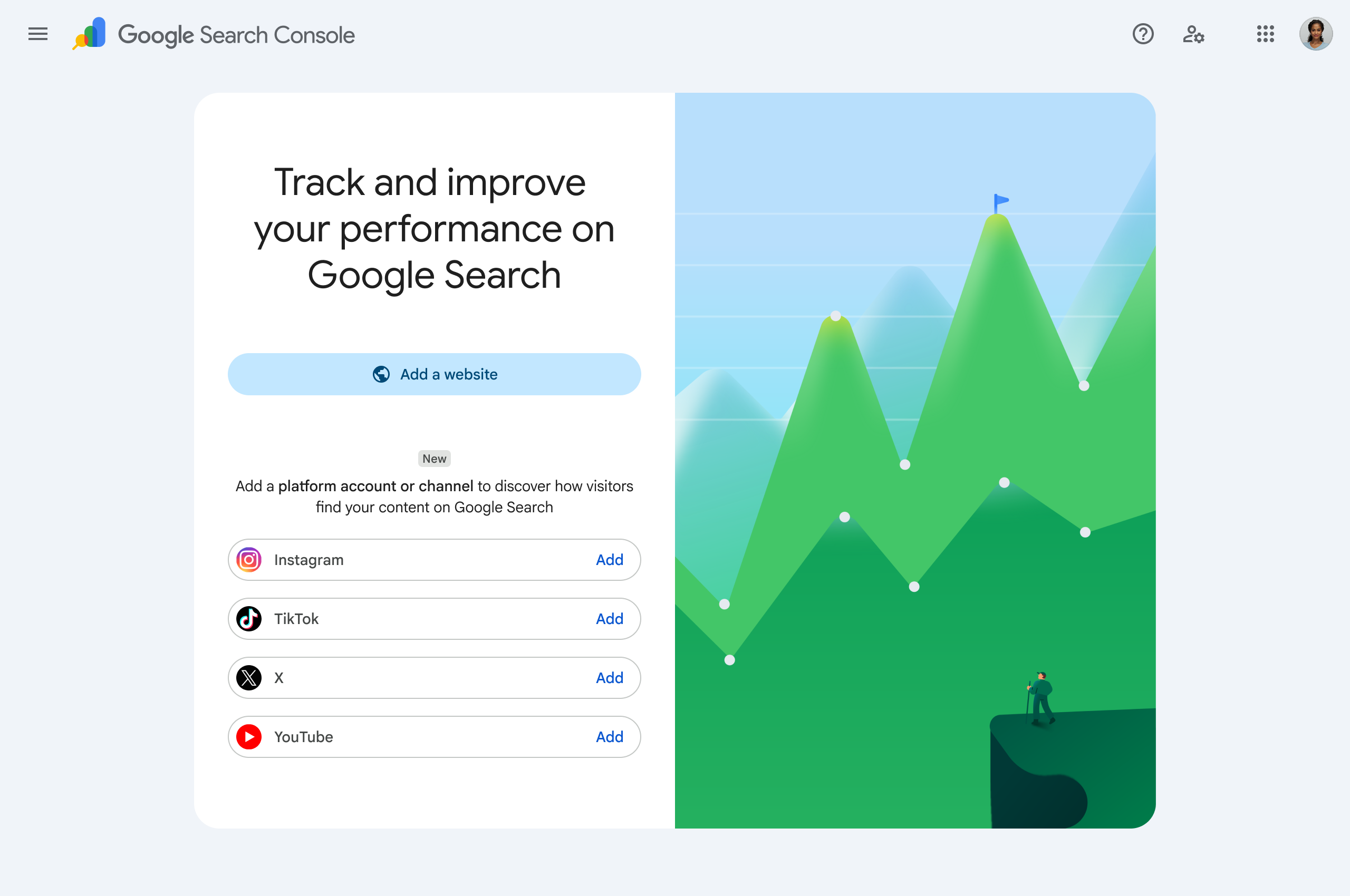
The strategic point is bigger than the feature itself. Google is confirming, explicitly and through its own tooling, that a brand's presence in Search is no longer just a function of its website. A TikTok video or an Instagram Reel can surface in Google Search or Discover, and now there's a dedicated way to measure that. This means "historical search performance" is no longer a single 16-month clock tied to one domain. It's potentially five separate clocks: the website property, plus a platform property for each of Instagram, TikTok, X, and YouTube, each one starting its own independent 16-month retention window the day it's verified and begins accumulating data.
That has a direct, practical consequence: the earlier a brand claims and sets up its platform properties, the more historical insight it will have available a year or two from now. A platform property claimed today starts building real, comparable trend data immediately. One claimed 14 months from now starts from zero, with no way to backfill what happened before.
But a platform property is only as useful as the content history behind it. GSC can measure performance, but it can't manufacture activity that wasn't there. This is where consistent publishing matters as much as the tracking setup itself. Circleboom's X Post Planner keeps a steady cadence of scheduled posts and threads on X, with an AI Writer that maintains the account's voice and a Post Analytics view that already tracks engagement and video performance over time, so there's an existing rhythm of content rather than sporadic bursts.
Circleboom's broader platform extends that same scheduling and automation approach to Instagram, TikTok, and YouTube. Once those accounts have a platform property tracked in GSC, the resulting Search and Discover performance data reflects a real, consistent publishing history rather than gaps that make trend analysis unreliable. The tracking tool and the content behind it need to move together, and the sooner both start, the more complete the historical record looks when someone finally asks to see it.
FAQ
Does Google Search Console really only keep 16 months of data, or can I request more?
The Performance report and the standard Search Analytics API cap out at roughly 16 months of history. There is no request process, support escalation, or setting that extends this. Once a date rolls outside that window, it's not accessible through GSC.
If I switch from a URL-prefix property to a Domain property, do I lose my old history?
The old URL-prefix property's data isn't deleted, but it also doesn't transfer into the new Domain property automatically. Each property tracks its own 16-month window independently. Keep the old property active (or export its data) rather than assuming the new one inherits everything.
Is the Search Analytics for Sheets add-on the same data as what I see in GSC?
Yes, it pulls from the same Search Analytics API that powers the Performance report UI, so the numbers should match what you'd see manually. It's just a way to automate the export and append it to a growing archive instead of doing it by hand each month.
Do I need BigQuery if I only manage one small site?
Probably not. A monthly manual export or a scheduled Sheets pull is enough for most single-site use cases. BigQuery earns its setup time when you need query-level granularity beyond what the UI shows, or when you're managing historical data across many properties or years.
What are Search Console's new platform properties for Instagram, TikTok, X, and YouTube?
As of July 2026, Google Search Console lets you register a property specifically for Instagram, TikTok, X, or YouTube accounts, showing how that platform's content performs in Google Search and Discover. It works alongside your existing website property rather than replacing it, and it runs on its own independent 16-month retention window from the date it's set up.
Will data before I verified a property ever show up later?
No. GSC can only report on data collected after verification. If a property is verified today, its history starts today, regardless of how long the site or account existed before that.
Next Step
If your Search Console property is approaching its 16-month mark without an export routine behind it, the fastest fix is setting up the Search Analytics for Sheets add-on this week, before the next batch of data rolls off the window. If a platform property for Instagram, TikTok, X, or YouTube hasn't been claimed yet, do that now too: every month it waits is a month of historical data that can't be recovered later.